Logs do not tell us why Google ranks a page. They tell us something else that is no less important: which URLs the bot actually requested, when, with what status, and at what cost to the server.
Data and sources as of: September 14, 2026
In a crawler export, we see what our crawler can traverse. In Search Console, we see Google's aggregated telemetry. In a server log, we see a specific HTTP request. That is why logs are indispensable for large sites, migrations, crawl diagnostics and cases where “Google cannot seem to see the pages”.
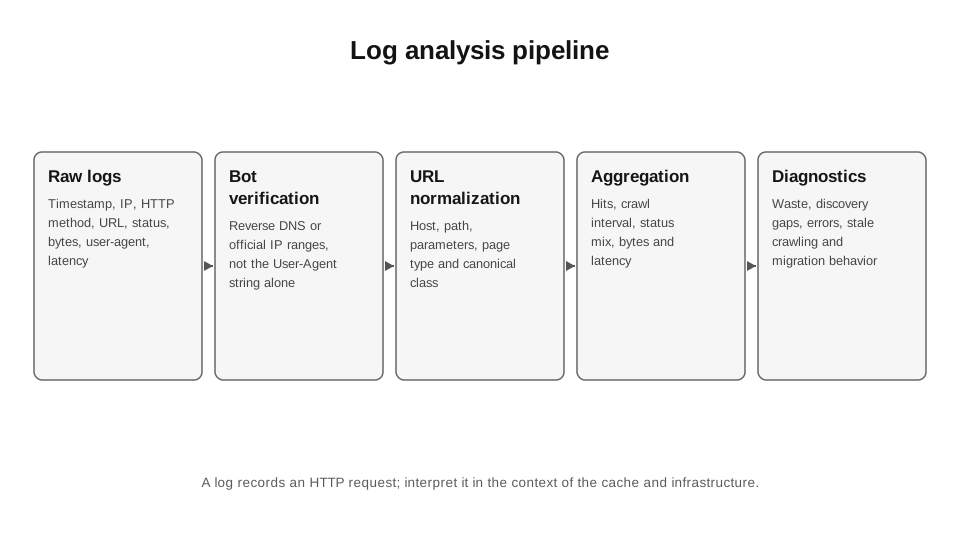
But log analysis can easily create an illusion of precision. A User-Agent can be spoofed, a reverse proxy can hide the client IP, a CDN may use a different format, and cache hits may not appear in origin logs. Before analysing anything, you need to understand exactly which layer is recording requests.
33.1. Verify Googlebot
Google explicitly warns that other crawlers often impersonate the Googlebot User-Agent. The most reliable approaches are reverse DNS verification or matching IPs against the published Googlebot IP ranges.[1]
I do not conclude that “Googlebot is hammering parameter URLs” based on an unverified user-agent. On a high-traffic site, this can completely distort the distribution.
33.2. Minimum fields
SEO requires timestamp, client IP, HTTP method, host, URL/path+query, status, response bytes, response time and user-agent. Referrer is not always useful, but I keep it if available. If the CDN adds cache status or edge/origin latency, even better.
From access logs, I create derived fields: verified_bot, bot_family, normalized_url, page_type, parameter_flags, date/hour, status_class. I do not alter the raw data—the derived layer can be rebuilt.
33.3. Crawl frequency
The number of hits is not, in itself, a metric of “importance”. Frequency depends on freshness, demand, signals, server capacity and many internal decisions. But within a single site, the distribution is useful: which templates receive 60% of requests, which new URLs the bot has not seen, and which old 404s keep being requested for months.
I calculate median/percentile recrawl intervals by page type, rather than an average across the domain. Combining the homepage and a million archive pages into a single average makes the number meaningless.
33.4. Status distribution
200 indicates that the fetch succeeded, but does not guarantee indexing. 301/302 show redirect overhead; 404/410 indicate removed URLs; 429 and 5xx may signal overload or an incident. Google recommends 500/503/429 as a temporary emergency measure to sharply reduce crawling, but this is a blunt instrument, and prolonged errors may cause URLs to drop out of the index.[2]
In my log dashboard, I look at the status mix specifically for verified Googlebot and segment it by page type. A 2% 5xx rate across overall traffic and a 20% 5xx rate for Googlebot requests to product pages are different situations.
33.5. Response time and crawl capacity
A slow server is not a “ranking penalty” in a simple formula, but crawl capacity is linked to the host's ability to respond without becoming overloaded. If latency rises and server errors appear, crawling may adapt.
I look at p50/p95 latency for bot requests, not just the average. One slow API endpoint in a template can create a long tail and make rendering/responses unstable.
33.6. Parameter waste
Logs clearly show whether crawling is being spent on sorting, tracking, session IDs, faceted combinations and internal search. I identify the top query parameters by hits and unique URLs. Then I check where they are discoverable: internal links, old backlinks, sitemaps or JS.
Not every “unnecessary” request should be blocked with robots.txt. If a parameterised URL already has signals or duplicates content, the solution may require a canonical, internal-link cleanup, redirects or removal. Robots simply prevents crawling of the content and may leave the URL known to the search engine.
33.7. Discovery vs refresh
As a rough distinction, it is useful to separate first-seen URLs from recrawls of existing URLs. If a launch includes 50,000 new products, but Googlebot has seen only 5,000 for the first time over three days, the problem is closer to discovery/crawl demand. If all have been seen but are not indexed, that is a different layer.
For this, I store `first_googlebot_hit`, `last_googlebot_hit`, `hit_count`. During a migration, I add old/new URL mapping and watch how quickly the bot traverses the redirect graph.
CODE 33.1. Basic aggregation of verified Googlebot logs.
# Analysis of already verified Googlebot CSV.
# Columns: timestamp,url,status,response_ms,bytes,page_type
import pandas as pd
df = pd.read_csv("googlebot_verified.csv", parse_dates=["timestamp"])
# Basic summary by page type.
summary = (df.groupby("page_type")
 .agg(hits=("url","size"),
 unique_urls=("url","nunique"),
 p50_ms=("response_ms","median"),
 bytes=("bytes","sum"))
 .sort_values("hits", ascending=False))
# Share of statuses within page_type.
status = (df.assign(status_class=(df.status//100).astype(str)+"xx")
 .groupby(["page_type","status_class"])
 .size().rename("hits").reset_index())
status["share"] = status["hits"] / status.groupby("page_type")
["hits"].transform("sum")
print(summary.head(30))
print(status.sort_values(["page_type","share"],
ascending=[True,False]).head(100))
33.8. Migration monitoring
After a migration, logs show actual recrawling of old URLs, redirects followed, requests to new URLs and errors. I build cohorts: old URLs with the most traffic, URLs with the most backlinks, categories and deep pages.
There is no need to wait two weeks to discover that Googlebot is hitting a redirect loop on 15% of the old inventory. This is visible within the first few hours.
33.9. What logs do not show
Logs do not show whether a URL is indexed, its ranking, citations in AI answers, search intent or a “crawl budget score”. A request is just a request. Logs therefore need to be joined with the crawl inventory, Search Console and status/canonical data.
The worst kind of analytics turns crawl frequency into a causal ranking factor: “Googlebot visits more often, so we need to make it visit more often.” Frequency may be a consequence of importance/freshness rather than a cause of rankings.
33.10. Storage and sampling
Logs for a large site can run into terabytes. I keep raw logs in low-cost storage and use a partitioned table with the required fields for analysis. Daily aggregates are sufficient for a recurring dashboard; raw logs are needed for incident drill-down.
Privacy/security matter: access logs may contain user IPs, query parameters and tokens. SEO should not receive more personal data than is needed for bot analysis. Filter and minimise.
| Question | Metric | What not to claim |
|---|---|---|
| What does the bot actually crawl? | hits / unique URLs | this is not indexing |
| Where are the errors? | status mix | a 404 is not always an SEO problem |
| What is slow? | p50/p95 response_ms | latency does not reveal an exact ranking weight |
| Does the bot see the launch? | first_seen cohort | crawl ≠ index |
| Are there many parameters? | hits by parameter | robots.txt is not a universal fix |
| How is the migration going? | old→new request cohorts | traffic recovery involves other factors |
Sources for Chapter 33
1. Google Search Central. Googlebot. https://developers.google.com/search/docs/crawling-indexing/googlebot — Verification through reverse DNS/IP ranges.
2. Google Search Central. Crawl budget management. https://developers.google.com/search/docs/crawling-indexing/large-site-managing-crawl-budget — Crawl capacity/demand and server responses.
3. Google Search Central. HTTP network errors. https://developers.google.com/search/docs/crawling-indexing/http-network-errors — HTTP status behaviour.
4. Google Search Central. Debug traffic drops. https://developers.google.com/search/docs/monitor-debug/debugging-search-traffic-drops — Separating technical issues from other causes.