Search Console is the closest thing to first-party Google Search telemetry, but it is not a “complete database of all queries”. Rigorous analysis requires knowing not just the metrics, but also the aggregation rules, privacy limits, canonical attribution and the differences between the UI, API and bulk export.
Data and sources as of: September 14, 2026
I rarely make SEO decisions without Search Console, but I trust a single screenshot from the Performance report even less often. GSC shows Google Search through Google’s eyes: impressions, clicks, CTR, position, query/page/country/device/search appearance. This is critically important. At the same time, the data is aggregated, some queries are hidden for privacy reasons, the UI has row limits, and page data is often attributed to the canonical URL.
So the key skill in working with GSC is not “knowing how to apply a filter”, but understanding the grain of each table and not comparing incomparable data.
32.1. An impression is not a pageview
An impression in Search Console is an event in which a search result is shown according to the rules of a particular surface, not a pageview. A click is a visit from Google Search. CTR = clicks / impressions. Position is the average topmost position of your result in the set, not a “keyword position” in the classic rank-tracker sense.
In SERPs with different features, the same average position can conceal very different click opportunities. So I do not forecast traffic from “position 3” alone. I look at query type, device, country, search appearance and, where possible, SERP composition.
32.2. Query tables do not contain all queries
Search Console hides some queries for privacy reasons. Anonymised queries are excluded from bulk export, while aggregated totals may contain data that cannot be broken down to a specific query.[1] This means that the sum of the rows in a query table may not equal the chart total.
The conclusion is simple: “other/unknown queries” are not an Excel error. Do not artificially distribute them proportionally across known queries and present that as fact.
32.3. Canonical attribution
Page-level Search Console data is usually assigned to the canonical URL. This is especially important during migrations and when dealing with duplicates, mobile/desktop alternates and canonical conflicts. If you look for an old URL and see no clicks, that is not proof that it had no visibility—the data may have been attributed to the canonical URL.
Before page-level analysis, I add canonical mapping from a crawler/GSC URL Inspection. Otherwise, “pages without clicks” may turn out to be duplicate URLs whose performance is recorded under another address.
32.4. UI: strong for diagnostics, weak as a warehouse
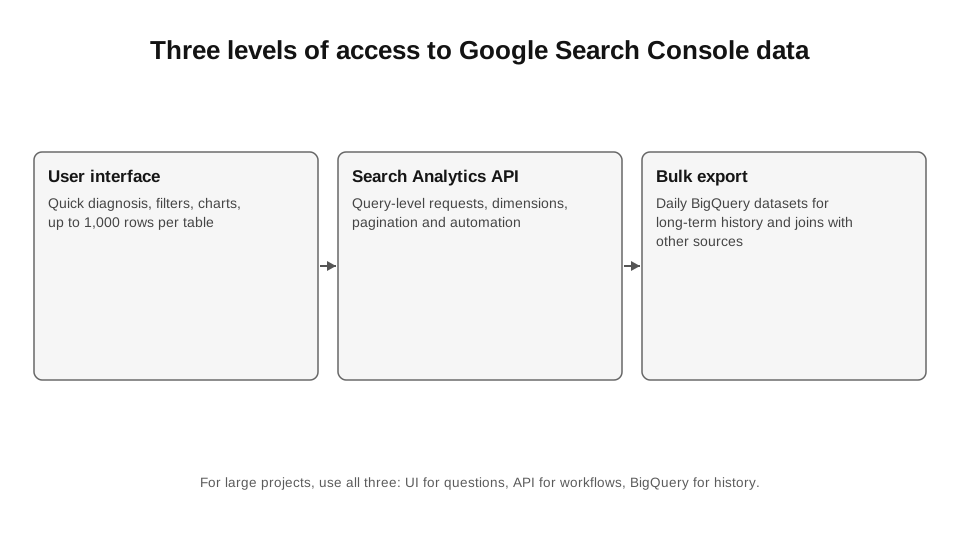
The UI is good for quick comparisons: the last 28 days vs the previous period, country/device splits, query/page filters, regex. But the table row limit means that an export is not a complete long-tail dataset. Google documents a standard table limit of 1,000 rows, which also applies to the generative AI report.[2]
So “I exported a CSV from GSC” does not mean “I have all the queries”. For large sites, this is only the top of the distribution.
32.5. Search Analytics API
The API lets you automate requests and pagination. The official documentation specifies a `rowLimit` of up to 25,000 and `startRow` for the next batch; a Search Central deep dive also described the availability of up to 50,000 rows per day per site/search type through this interface.[3][4]
I use the API for operational requests: daily top pages by country/device, automatic updates to an internal dashboard, lightweight monitoring. For complete, multi-year long-tail analysis, bulk export is better.
32.6. Bulk export to BigQuery
Bulk export creates `searchdata_site_impression`, `searchdata_url_impression` and `ExportLog` daily. The URL table provides detailed query × URL granularity and search appearance fields; the site table provides property-level aggregation. The export is not constrained by the Search Analytics API’s daily row limit, but anonymised queries are excluded.[1]
I preserve this dataset as a historical record. I do not take weekly CSV snapshots that lose the long tail. I can then join it with CMS inventory, page type, GA4 revenue, log data and content changes.
CODE 32.1. URL-level performance from Search Console bulk export.
-- Example: URL-level performance over the last 28 days from GSC bulk export.
-- Replace project.searchconsole with your project.dataset.
SELECT
 url,
 SUM(clicks) AS clicks,
 SUM(impressions) AS impressions,
 SAFE_DIVIDE(SUM(clicks), SUM(impressions)) AS ctr,
 SAFE_DIVIDE(SUM(sum_position), SUM(impressions)) + 1 AS avg_position
FROM `project.searchconsole.searchdata_url_impression`
WHERE data_date BETWEEN DATE_SUB(CURRENT_DATE(), INTERVAL 28 DAY) AND
CURRENT_DATE()
 AND search_type = 'WEB'
GROUP BY url
HAVING impressions >= 100
ORDER BY clicks DESC;
32.7. BigQuery cost discipline
Search Console tables are partitioned by `data_date`, so always apply a date filter. Google specifically recommends limiting the partition range, filtering early, using sampling during development and, where acceptable, approximate functions.[5]
I do not connect Looker Studio directly to the raw dataset for every chart. I create pre-aggregated tables: daily site, daily page type, weekly query cluster. This is cheaper, faster and more stable.
32.8. Generative AI report 2026
As of August 31, 2026, Google had rolled out the Search Generative AI performance report worldwide.[2] It shows generative AI impressions and supports analysis by Pages, Countries, Dates and Devices. An important limitation: this is not a query report or a separate click/CTR/position report.
Chart data is aggregated at the property level: if two results from the same site appear in a generative feature, this may count as one property impression under the documented rules. Aggregation changes when a URL filter is applied. The metric therefore needs to be read literally, not called an “AI rank”.
32.9. Search Console data anomalies
Before panicking over a sharp drop, I check Search Console Data Anomalies. In 2026, Google published logging issues for the Generative AI report and Discover, for example. If the anomaly is in logging, no “SEO recovery plan” is needed.
This is a small habit with a large ROI: first check whether the measurement layer has changed, then look for a site problem.
32.10. Regex as an analytical tool
Regex in GSC is useful not for “magic keyword hacks”, but for quick segmentation: branded/non-brand, question patterns, page folders, product IDs. I keep the core regex patterns in a repository so that monthly reports do not depend on how the analyst wrote `brand|бренд|brand typo` this time.
For important segments, it is better to replace regex with a taxonomy in the warehouse: query cluster or page type. Regex is a good exploration layer, but a weak source of long-term truth.
32.11. What GSC does not show
Search Console does not provide conversion value, the complete user journey, the full SERP layout, backlinks, competitor rankings, all queries or causal explanations for ranking changes. The generative report does not show the exact user query. All of this must be obtained from other systems.
This is precisely why GSC is the core of SEO measurement, but not a complete SEO analytics solution. A strong stack combines Search Console with GA4/business data, logs, a crawler and external SERP measurement.
| Task | UI | API | Bulk export |
|---|---|---|---|
| Quick diagnosis | best | unnecessary | unnecessary |
| Small recurring report | possible | best | possible |
| Full long-tail dataset | no | limited | best |
| Multi-year history | limited | must be stored | best |
| Join with CMS/GA4 | manual | possible | best |
| Generative AI exposure | separate UI report | depends on interface availability | do not replace the official report with assumptions |
Sources for Chapter 32
1. Google Search Central Blog. Bulk data export. https://developers.google.com/search/blog/2023/02/bulk-data-export — Table schema and privacy limits.
2. Search Console Help. Generative AI performance report. https://support.google.com/webmasters/answer/16984139?hl=en — Global rollout August 31, 2026, dimensions and limits.
3. Search Console API. Search Analytics. https://developers.google.com/webmaster-tools/v1/how-tos/search_analytics — rowLimit and pagination.
4. Google Search Central Blog. Performance data deep dive. https://developers.google.com/search/blog/2022/10/performance-data-deep-dive — UI/API limits and aggregation.
5. Google Search Central Blog. BigQuery efficiency tips. https://developers.google.com/search/blog/2023/06/bigquery-efficiency-tips — Partition filters and cost optimisation.
6. Search Console Help. Data anomalies. https://support.google.com/webmasters/answer/6211453 — Known logging/processing anomalies.