SEO 2026 / Practical website and app creation
Build a website, SaaS or store with Lovable. Start with a real plan.
Use the basic brief builder or choose seven independently copyable, real-world technical prompts for SEO, SaaS, CRM, ecommerce, migration and lead capture with acceptance tests.
No email required · No charge for the prompt · Official, non-referral Lovable link
Unlike “make a nice website”, your brief already specifies real pages, user journeys, data security and acceptance tests.
What would you like to build?
First measurable outcome
Request a consultation
My first project · Interior design studio
Prompt updates automatically when you edit the fields.
Preview the full eight-section prompt
Generated in your browser. Your project details are not uploaded or stored.
Real prompts by task
7 real implementation briefs, not one generic template
This page creates a starter brief. For a real implementation, use a focused full-length prompt with scenario-specific security, SEO and acceptance checks.
Five practical starter projects
What will you actually get?
Business website
Outcome: Request a consultation
Working flow: Choose service → complete validated enquiry form → receive genuine confirmation only after actual delivery. Provide error and empty states.
Acceptance: Submit a test enquiry on mobile and confirm it was actually delivered.
SaaS / AI application
Outcome: Create, edit and save a content plan
Working flow: Sign up → create project → add topics → edit → save → log out → log back in → reopen. AI generation is a separate optional step, not a placeholder advertised as functional.
Acceptance: Reload a saved plan and prove another test account cannot access it.
Online shop
Outcome: Build a cart and submit an order enquiry
Working flow: Filter → choose product → change quantity → cart → validated order enquiry with an actual saved result. Cover sold-out items, empty cart and failed submission.
Acceptance: Persist a test order and confirm server-side price validation.
CRM / internal dashboard
Outcome: Track and update support tickets
Working flow: Log in → filter tickets → open a ticket → change status → save → reload. Cover conflict, invalid values and unauthorised actions.
Acceptance: Verify a restricted user cannot read an unauthorised ticket via direct API request.
SEO blog
Outcome: Find a useful article and discover the next
Working flow: Topic → article → related reading. Search has a useful empty state. Draft and publication must be distinct actions; nonexistent article returns 404.
Acceptance: Fetch article HTML without JS and check text, 200, canonical, internal links and sitemap.
Explore different website structures
Public project examples
These are public projects associated with the publisher. They are not Lovable-certified success stories, and no performance claims are made.
First build workflow
Three steps to a testable result.
01. Pick one outcome
Build just one usable path: a real enquiry, saved plan, cart, ticket or article.
02. Paste the prompt
Start a new Lovable project and approve integrations only as needed. Don't let the builder invent business facts.
03. Verify the result
Check mobile, data persistence, permissions, errors, rendered HTML, canonicals and HTTP statuses before publishing.
Search-intent library
Looking for a specific answer, not another generic overview?
Lovable vs Bolt, alternatives, free builders, SaaS, CRM, ecommerce, SEO and prompts — each has its own guide with examples and test criteria.
Browse all focused SEO guides →2026 field guide · AI website builders and no-code web apps
How to build a website or app with AI: choose your builder, write better prompts, launch and verify SEO
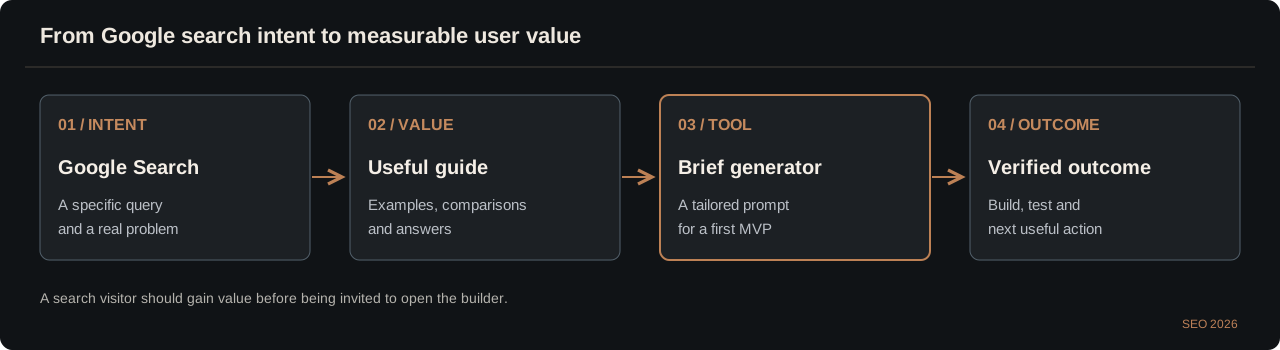
A practical guide for founders, marketers, SEOs and developers. Compare AI app builders by the work you need done, design an MVP, test forms and data access, inspect server-rendered HTML, plan hosting and avoid spending your entire budget on repetitive revisions. The free interactive project-brief builder above turns one idea into a complete starting specification.
Updated October 14, 2026 · Editorial framework, not a claim that every platform was laboratory-tested. Plans and limits change.
Search intent & brief
Audience, problem, real acceptance criterion
Working MVP
Forms, routes, actual data and honest error states
Code & verification
Tests, GitHub, access rules, meaningful HTML
Launch & improvement
Domain, sitemap, Search Console and user feedback
This describes a responsible delivery workflow. It is not an automated guarantee of search rankings, security or revenue.
| Tool / approach | Best starting use case | Useful advantage | Verify before you commit |
|---|---|---|---|
| Lovable | Websites and full-stack MVPs described in natural language | Rapid interface iteration and GitHub Sync | Credit use, backend permissions, SSR and export |
| Bolt.new | Browser-based rapid web application prototyping | Flexible code-first iteration | Plan constraints, backend setup and maintenance |
| Replit Agent | Development connected to a runnable environment | Integrated editor, execution and deployment | Resource pricing, security boundaries, ownership |
| Google AI Studio | AI-first experimentation and prototypes | Accessible path to model integrations | Usage limits, publishing and backend requirements |
| v0 | React interface components and front-end flows | UI generation within a developer ecosystem | Authentication, payment and database work remains |
| WordPress / CMS | Large editorial websites and recurring publishing | Established publishing workflows and plugins | Theme speed, maintenance, permissions and plugin risk |
No fabricated ratings or winners: these products and their pricing evolve quickly. Compare the same working scenario, measured cost, source-code portability, data ownership, useful HTML and ongoing maintenance.
1. Choosing an AI website builder by user intent
The question is not whether an agent can generate React. It is whether the website helps a real person accomplish a useful task. Define that task before comparing builders.
Separate a convincing interface from a useful product
For a service business, the valuable result is a properly delivered consultation enquiry, not a glowing hero section. For a SaaS product, it is a saved result users can reopen after authentication. For a shop, it is a correct order with real pricing and inventory. For an editorial publication, it is an answer supported by real examples, connected to relevant reading and accessible to a search crawler. These are different jobs and require different acceptance tests.
A model may generate an attractive dashboard containing graphs, testimonials and icons before any data service has been configured. That is a prototype, not proof of an operating business. Before asking an AI builder to start, write down the intended user, their journey, the data involved and one measurable definition of done. If a stakeholder cannot demonstrate the outcome, the development task is still ambiguous.
- One MVP should complete one useful user journey.
- List the real business facts the model must not invent.
- Define acceptance checks before adjusting the visual style.
Use complexity and risk to narrow the stack
A static public site with accurate contact information has relatively little application logic. A form collecting personal information adds delivery, storage and privacy requirements. A customer-facing SaaS adds authentication and account isolation. Billing, sensitive records or payment reconciliation increase the consequences of errors. You do not solve these differences by writing a longer decorative prompt; you solve them with architecture and test coverage.
Established CMS platforms may be more reliable for a publication with numerous writers and revision rules. An AI-first builder may be faster for a new SaaS prototype. A developer maintaining an existing repository may prioritise tests and Git integration over visual speed. The most appropriate tool therefore depends on how your team will operate the system six months after the first demo.
- Business landing page: trustworthy content and real enquiries.
- Private app: saved data, server permissions and secure sessions.
- Search-driven publication: stable URLs, editorial workflows and linked topical coverage.
2. Free AI website builders: the costs the landing pages omit
A free tier is usually permission to start experimenting, not a promise of unlimited prompts, custom domains, databases or published production traffic.
Break the total cost into four distinct layers
The first cost is generation: credits, messages or tokens used to create and revise code. The second is hosting and compute. The third is data storage, file delivery and authentication. The fourth is external services such as email, maps, payment processing and additional AI models. A prototype can appear inexpensive while relying on integrations that become the largest bill when users arrive. Compare these categories separately instead of assuming a single monthly figure includes everything.
As of October 2026, Lovable has a Free plan with a monthly cap on complimentary build credits and Pro tiers with subscription and daily allowances. Cloud and AI services have separate usage considerations. Verify the vendor's current documents on the day you purchase; plan specifics, billing regions and trial terms can change. Build credits are units of product use rather than a cash balance and should not be represented as guaranteed cost savings.
- Estimate monthly active users, file volume and external API calls.
- Include custom domains, email delivery and data backups.
- Budget for changes after the first release, not only the first demo.
Avoid unnecessary iteration before you buy more credits
The most wasteful development conversation repeats 'make it more modern', 'go back to the previous version' and 'fix the design' without an approved reference or concrete acceptance criteria. Create a scope document including target audience, page list, core flow, data requirements, design direction and prohibited changes. Ask the agent to modify only relevant components and report exactly what it touched. This is more effective than letting it repeatedly redesign the entire project.
When the initial prototype exists, perform inexpensive text changes in the supported visual editor or make small source-code commits through GitHub. External agents can modify and test a branch without charging the Lovable build-credit pool, though those providers may charge separately. Preserve a known-good commit and use a preview environment for risky changes. A plan upgrade may still be appropriate, but it should follow a usage review.
- Approve one detailed brief before implementing the first release.
- Use small, reviewable branches for subsequent changes.
- Don't pay an AI agent to rediscover information already in your source files.
3. Lovable alternatives: compare Bolt, Replit, v0, AI Studio and a CMS fairly
The search intent behind 'best AI app builder' is usually about a working product and future ownership. A controlled comparison is more useful than an arbitrary ranking.
Run the same scenario through your shortlist
Use a practical test brief: a product catalogue with search, two filters, a cart or enquiry flow, validation errors and persistent sample records. Implement the same acceptance criteria in two or three builders. Measure how many corrections are required before the complete workflow succeeds, whether a second account can access protected data, and how the page behaves on a small mobile screen. Do not compare only the quality of the very first generated screenshot.
Repeat the test with JavaScript disabled for public pages. Fetch the HTML and check whether readable content and links are present. Also inspect what happens when the free trial expires or the platform's proprietary cloud service becomes unavailable. Exporting source code is not the same as migrating authentication records, secret storage, customer uploads, payment configuration and webhooks. This exit cost matters to any product you want to own.
- Test real persistence and error handling.
- Test public HTML, accessibility and mobile behaviour.
- Compare ongoing cost and the complexity of leaving the platform.
Know when a different tool is a better decision
For a complex editorial site with established author permissions, media library, translations and bulk publishing, a mature CMS might cost less to maintain than a freshly generated administration system. For workloads based on Python tasks or complex background jobs, an environment suited to backend development may be more appropriate. For teams already building React applications, a component-generation tool can accelerate UI work while the existing engineering stack continues to manage the backend.
Lovable and similar products are attractive when a founder needs to test demand quickly and a web-first workflow fits their constraints. They are not a replacement for review, observability or secure operations. Ask how each platform exposes source history, CI configuration, database backups, deployment rollback and service ownership. These questions are much more important than whether the app can be generated in five minutes.
- Compare complete workflows, not vendor slogans.
- Prefer a maintainable architecture over a flashy first screen.
- Avoid vendor lock-in assumptions you have not tested.
After identifying your first product, don't start from a blank chat. The generator above creates a tailored eight-part technical brief and real acceptance checks. Generate a working project brief →
4. How to build a lead-generating business website using AI
An AI landing page needs a clear offer and a path to a genuine lead. No amount of animation compensates for invented credibility or a broken contact form.
Start with a concrete customer question
Consider an interior design studio. The home page should communicate whom it serves, which services are available, what a project typically involves and how to request a consultation. Service pages need a distinct purpose, practical details, terms and real examples. A portfolio must use work you own or are licensed to show. A contact page should provide dependable ways to reach the business. Privacy notices should reflect actual processing and service providers rather than generic generated legal text.
When creating a form, require visible field labels, validation, rate limiting and a meaningful success response that appears only after the submission is actually stored or delivered. Try empty values, malformed email addresses, repeat submissions and connection failures. A common AI-builder failure is to show a friendly confirmation toast without a configured destination. That may improve the demo but wastes every real visitor who fills it in.
- One clear primary conversion action in the hero.
- Real portfolio, services and trustworthy contact information.
- Test actual lead delivery from a mobile device.
Local SEO without doorway pages
For a local company, geographic relevance should come from real service coverage, customer examples, business information and useful details about the area. Adding a town name to title tags is not sufficient. Avoid generating hundreds of near-identical location pages with no unique service context. Where a business has a verified profile, keep details consistent with the website, including opening information and contact instructions.
Connect service pages through navigation and relevant content rather than relying solely on an XML sitemap. Check that each address returns 200, has a correct canonical and remains accessible through internal links. Once Search Console data appears, inspect which service queries generate impressions and whether the landing page truly matches those intents. Improve a weak service page with specific examples and answers, not repetitive AI paragraphs.
- Publish geographic pages only when they deliver distinct value.
- Use meaningful image descriptions and permitted real images.
- Evaluate qualified enquiries, not just organic landing sessions.
5. Creating a SaaS MVP or AI web app without traditional coding
The essential promise of SaaS is that a user can do something valuable repeatedly, save the output and return. Start there, before adding paid AI features.
A minimum complete SaaS user journey
For a content planning application, the first release might contain a public features page, registration, sign-in, a project dashboard, an editor, a save action and account settings. Users should be able to add content topics, make changes, save their plan and reopen it in a new session. Provide empty states that teach the first action, show loading and error messages, and support basic account recovery. A chart with mock data is not proof that analytics have been connected.
Build with at least two test users. The second must not access the first user's plans, even by guessing an object identifier or calling an API endpoint directly. Permissions must be enforced at the database or server boundary rather than only in React. Add AI generation after the core editor and storage are reliable, and set spending limits and privacy rules before forwarding customer data to a model provider.
- Test save → log out → sign in → reopen.
- Check account isolation at the API layer.
- Treat optional AI as an integration with explicit costs and failure handling.
Billing, upgrades and a trustworthy pricing page
A beautifully designed pricing component is not the same as a working subscription system. Every plan must correspond to actual entitlements, usage limits and billing events. Validate payment-provider webhooks on the server and use a sandbox during testing. Do not let the browser decide whether an account is premium based on a client-side flag. Test cancellation, failed payments, duplicate events and relevant refund workflows before accepting real money.
The organic acquisition strategy should offer genuine utilities and education for the same audience as the software. A free template, interactive content planner or documented workflow often creates more value than dozens of thin keyword pages. A dedicated SEO landing page is worth building when it addresses a distinct job to be done, not simply because it represents another string in a spreadsheet.
- Keep billing authority on the server.
- Explain the data export and deletion process.
- Optimise the product for returning users, not just demo sign-ups.
6. Building an online store with an AI website generator
An e-commerce application is a transaction system, not merely a product grid. Treat prices, availability, order records and payment state as critical data.
The smallest honest commerce experience
A useful initial store has a catalogue, category navigation, product details, options and quantities, a real cart, an order form and truthful delivery and return information. The system should handle zero stock, changes in selected variants, an empty cart and a network interruption. Customer information must be validated before an order is created. The server must calculate trusted totals, because values sent by a browser can be modified by the visitor.
Use a protected product editor or reliable import as the inventory source of truth. Do not invent discounts, shipping guarantees, customer reviews or store locations. If payments are introduced, configure the actual provider, sandbox checkout, verified webhooks and a state machine for orders. Do not ask an AI agent to create a custom card-processing system without the controls required by the payment ecosystem.
- Test item selection through a saved order record.
- Verify prices and inventory against server data.
- Ensure every checkout failure produces clear recovery instructions.
SEO for categories, products and filters
Product categories should reflect actual inventory and customer search tasks. Include useful filters, distinct product attributes and editorial guidance on choosing an item. Product pages benefit from unique specifications, licensed pictures, variant details and accurate availability. A wall of generic AI-generated adjectives is unlikely to help buyers choose. Thin category combinations and empty filtered URLs should not automatically become indexable landing pages.
Use canonical links consistently for variant and filter handling. Generate Product structured data only when the visible page and data meet the supported requirements. Structured data is not a way to fabricate rich snippets or missing reviews. Check that product URLs return meaningful HTML, and that removed products have an appropriate status or well-considered alternative. Keep sitemap entries aligned with canonical, available pages.
- Prevent faceted navigation from exploding into duplicate URLs.
- Publish genuine specifications, prices and availability.
- Validate schema and HTTP status independently of the visual preview.
7. Building a CRM, admin dashboard or customer portal with AI
For a private application, search rankings matter mainly to its public marketing and documentation. Secure user permissions matter to the actual product.
Model roles before generating screens
In a support team dashboard, employees sign in, find a ticket, update its status, add a note and later verify that the change persisted. Managers may have additional rights to assign work, export records or administer accounts. Those capabilities need a permissions matrix before implementation. Hiding a button in the interface does not prevent a direct API call. A user must not be able to become an administrator by changing a local browser variable.
Use two or more roles in integration tests. Test object-level access, not merely route visibility. If saving fails, the interface should preserve unsaved input and explain what happened. An audit trail for sensitive updates and an export process may be essential once the app is used in daily operations. Establish backups, record retention and deletion rules before production use.
- Enforce permissions on the server and database.
- Test an unauthorised API request directly.
- Make failure and conflict handling part of the MVP.
Where a private application should and should not use SEO
A CRM can attract organic traffic through public feature descriptions, pricing, integration guides and useful support documentation. Those are appropriate candidates for indexation because external searchers have questions they can answer. Private lists of tickets, customer addresses, billing records and team dashboards are not search landing pages and should never appear in public sitemaps or structured data.
Robots directives are not an alternative to authentication. If a URL contains private content, it must enforce access restrictions even if Googlebot never requests it. Do not generate large marketing paragraphs inside authenticated pages simply to raise your word count. Good product documentation and onboarding will provide more value to your real users.
- Index public help and product pages, not personal records.
- Keep private data out of metadata, schema and caches.
- Don't mistake noindex for an access-control system.
After identifying your first product, don't start from a blank chat. The generator above creates a tailored eight-part technical brief and real acceptance checks. Generate a working project brief →
8. Building an SEO blog or content website using AI
For publishers, a credible site is a connected editorial system. Search visibility depends on distinct useful answers, not the number of URLs an agent can generate.
Design a hub-and-cluster structure around actual questions
Take a site about balcony gardening. A central guide might help a beginner plan the season, while specialist pages answer narrower questions about containers, soil, drainage, watering during a heatwave and choosing plants. These pages should not compete for the exact same query with near-identical content. Each needs a specific intent, a practical outcome and logical links to the next question. Categories and breadcrumbs should help people browse, not merely serve as keyword containers.
The most valuable material includes observed results, real photographs, measurements where appropriate, cited sources and context such as climate and growing conditions. AI can assist with planning, editing and interface design, but it cannot create first-hand field evidence by rephrasing existing pages. Long, repetitive sections generated to reach a word count are unlikely to create meaningful differentiation.
- Give each article a distinct search task.
- Provide real examples and author accountability.
- Use internal links as reading paths rather than keyword stuffing.
Technical publishing and editorial workflow
Public articles need useful initial HTML, a correct HTTP response, unique title and meta description, coherent headings, links and accurate canonical tags. Drafts should not be listed in a public sitemap. If an article does not exist, return a real 404 rather than a 200 page with an empty shell. If the main text is loaded entirely after client-side JavaScript, verify the crawler sees the same essential information as the reader.
An editorial workflow should distinguish drafts, review, scheduled publication and updates. Track revisions and avoid rewriting an entire topic just because one fact changed. After publishing, measure query clusters, impression trends and reader navigation instead of treating the word count as a performance metric. Original research, calculators, checklists and demonstrably helpful tools can be more valuable than another long summary.
- Implement draft → editorial review → publication.
- Keep XML sitemaps limited to live canonical addresses.
- Track which user problems the content actually solves.
9. Effective AI website prompts: write a product spec, not a wish
A reusable prompt for a builder is a short technical specification. It defines the audience, pages, essential journeys, data rules, design and how to verify the result.
The eight pieces of a strong implementation brief
Start with the product, user and boundaries of the first release. Define the page map and meaningful URLs. Describe the actual journey from the first action to a saved or submitted result. Specify database and user permissions, integrations and secret handling. Set an accessible responsive design direction. Add technical SEO requirements for public routes. Require real facts and privacy safeguards. End with explicit acceptance tests and an instruction not to publish without permission.
The interactive generator above creates that structure for a business site, SaaS, shop, CRM or SEO publication. Replace its default examples with your niche, target audience and genuine business data. Do not delegate missing prices, clients, awards or addresses to a language model. If you are editing an existing project, tell the builder which routes, data tables and critical services must remain unchanged.
- Name the user and measurable outcome.
- Separate required functionality from future additions.
- Ask the agent to report verified, unverified and blocked items.
How to ask for a targeted fix without breaking your site
After launch, a vague request like 'make all SEO perfect' encourages uncontrolled rewrites. Instead, give the exact affected route, reproducible behaviour, expected status, log output where available and the file scope. Ask for a regression test and a reviewable diff. If only a title should change, don't authorise modifications to the database, payments, authentication or book downloads.
For example, a broken sitemap is best debugged by inspecting the response status, XML content type, actual URL entries and generated route code. A page missing from Google may require robots, canonical, server response and Search Console checks, not immediate regeneration of every article. Precision in the prompt improves both reliability and the number of credits needed.
- Describe reproduction steps, not just dissatisfaction.
- One change should have one explicit verification.
- Save a known-good version before risky refactoring.
EXAMPLE · SCOPED DEBUGGING BRIEF
Fix only /sitemap.xml. Expected: HTTP 200, application/xml and valid canonical <url><loc> entries. Actual result: [paste error]. Keep authentication, UI, published content and payments untouched. Include an XML regression test and a file-level diff. Do not deploy without approval.
10. Technical SEO for AI-generated websites: SSR, canonical and real HTML
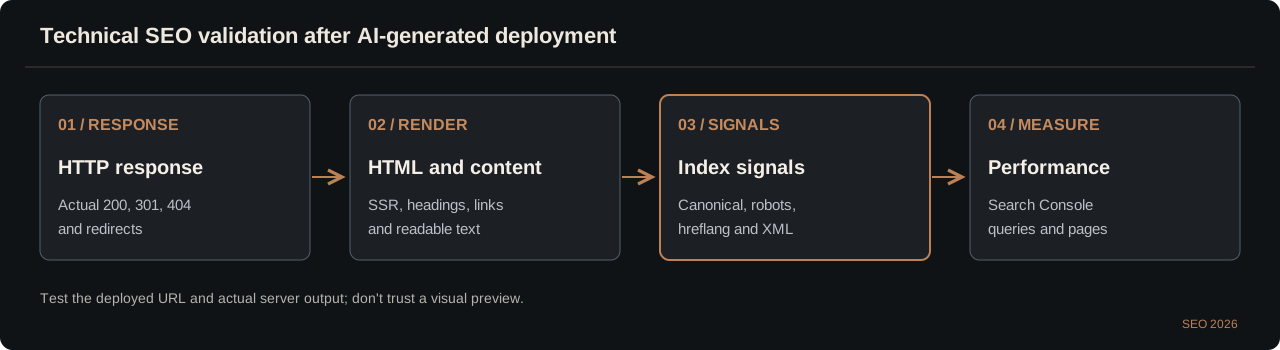
Publishing a page does not make it indexable. Crawlers need meaningful content, coherent link paths and the HTTP statuses that correspond to reality.
Inspect what the server actually returns
Test the first HTML response rather than relying only on the React interface after hydration. It should contain useful text, the intended H1, page-specific metadata, crawlable links and a canonical referring to the final URL. SSR is not a universal ranking shortcut; what matters is whether crawlers receive content correctly, can discover the page and encounter a useful result. Use both a raw HTTP request and a rendered-page inspection.
A site that returns HTTP 200 for every made-up address risks soft 404s. A permanently moved address deserves a specific redirect, while an absent page should return 404. A canonical tag is a consolidation hint, not a substitute for status codes or actual navigation. These fundamentals are testable without a paid SEO plugin or a particular AI builder.
- Check 200, 301 and 404 where appropriate.
- Make canonical targets live, relevant and consistent.
- Ensure meaningful text and links are present in the initial response.
TERMINAL · BASIC HTTP CHECKS
curl -I https://example.com/useful-guide
curl -Ls https://example.com/useful-guide | head -c 2500
curl -I https://example.com/not-a-real-page
Control rendering, parameters and duplicate URLs
AI-generated sites often expose duplicates through trailing slashes, inconsistent hosts, preview domains, language routing, filter parameters or multiple paths to the same content. Select a consistent canonical strategy and make internal links follow it. Language versions should have their own canonicals and reciprocal language annotations, not a canonical pointing all English material to the Ukrainian home page.
A noindex tag is appropriate when a public route should not be indexed, but it is not a means of keeping data secret. Robots.txt affects crawling rather than protecting confidential content. If new pages disappear from search, inspect HTTP headers, robots directives, redirect chains, authentication gates, canonical tags and the initial document before submitting bulk reindexing requests.
- Prevent preview and staging sites from competing with production.
- Inspect both server HTML and fully rendered HTML.
- Avoid redirect chains and conflicting slash or domain signals.
11. Schema.org, JSON-LD, sitemaps and hreflang for AI sites
These technical signals explain the content and help engines discover URLs. They cannot turn unsupported claims into facts or guarantee enhanced search snippets.
Use structured data that matches the visible page
An editorial article may use Article markup with an accurate author and publication dates. A product page may use Product data with real price and availability. Organisation details must be verifiable. Do not invent Review or AggregateRating numbers to decorate an otherwise ordinary page. Google offers rich results for a selected set of formats subject to its published requirements; valid markup does not guarantee that any special treatment will appear.
If a page contains a functioning web utility, structured data may describe the application when the type is appropriate. Avoid fabricated installations, ratings and subscription features. Keep URLs, headlines and authors consistent with the visible document. Test markup with tools designed for its type, and retain useful content for readers even when all markup is removed.
- Only publish data you can support.
- Schema validity is not a promise of rich results.
- Update markup when the underlying content genuinely changes.
JSON-LD · ILLUSTRATIVE NOT PRODUCTION DATA
{"@context":"https://schema.org","@type":"Article","headline":"Actual article headline","inLanguage":"en","author":{"@type":"Person","name":"Verified author name"}}Build a clean sitemap and language pair
A good XML sitemap lists live, indexable, canonical URLs returning 200. It is not a catalogue of preview pages, redirects, noindex routes or planned future content. Lastmod should reflect substantive changes, not a daily timestamp applied to the entire site. Duplicated sitemap entries and invented freshness do not increase the usefulness of your website.
For an English/Ukrainian pair, use an English self-canonical, a Ukrainian self-canonical and reciprocal hreflang annotations with truly equivalent content. The language switch should link directly to the matching page instead of the other language's homepage. An English H1 attached to a Ukrainian prompt generator is not a complete translation.
- Do not point all language canonicals to a single URL.
- Annotate only real translations that exist.
- Test sitemap XML and reciprocal alternate links after deploy.
LANGUAGE PAIR · VERIFY BOTH SIDES
UK: /oglyad-lovable-seo-2026 → canonical UK, hreflang en = EN
EN: /en/lovable-ai-app-builder → canonical EN, hreflang uk = UK
sitemap.xml: each real canonical URL exactly once
12. Core Web Vitals, page speed and accessibility
An AI-generated interface is not good just because it has premium gradients. It must remain usable, responsive and responsive to user input.
Reduce friction in the first screen
Oversized hero videos, uncompressed images, unnecessary carousels and multiple external scripts increase loading time. Decide what needs to appear immediately and avoid delaying the main content behind animation. Set image dimensions, use suitable formats and optimise fonts. Lazy-loading the primary hero asset can make Largest Contentful Paint worse rather than better. An eye-catching site that is slow on a midrange phone often undermines its own acquisition funnel.
Review Core Web Vitals using both laboratory checks and available field data. LCP describes how fast the main content appears, INP reflects interaction responsiveness and CLS captures unexpected layout movement. Avoid treating one Lighthouse score as permanent proof that every visitor will have the same experience. Look at the actual assets, generated bundles and third-party tags behind the result.
- Prioritise critical content and a fast server response.
- Reduce long JavaScript tasks and unnecessary event handlers.
- Reserve space for images, embeds and advertising.
Accessibility affects real conversion
Forms need persistent labels, validation messages and status feedback that does not depend on colour alone. Keyboard users must be able to open menus, select options, copy generated prompts and activate outbound links. A visible focus indicator should not disappear behind a visual design system. Semantic headings and logical tab order make the page easier to navigate for assistive technology and for everyday visitors.
Test the layout at 360 pixels, with large text settings and reduced-motion preferences. Wide comparison tables can have an intentionally scrollable container, but the whole page should not overflow horizontally. A tool that forces people to fight the interface before they can copy a prompt is not a successful acquisition page.
- Test Tab, Enter, Escape and focus visibility.
- Provide explicit labels and understandable errors.
- Check mobile layout with larger text and no horizontal page overflow.
13. Security, privacy and production AI integrations
An AI builder can generate backend code, but it does not remove your responsibility for protecting records, managing secrets or validating sensitive flows.
Never accept security based only on the demo
Do not place model keys, webhook secrets or database administrator credentials in browser code, public commits or visible error messages. Enforce row-level or equivalent database access rules for private records. Check which file buckets are public and which are private. Client-side route guards are not substitutes for server-side authorisation. Use more than one test account to detect object-level access failures.
AI integrations require input privacy, rate limiting, usage budgets and correct error handling. If user-provided information is sent to an external model, explain the processing and avoid using genuine customer records as convenient demo data. Contact forms need spam protection and reasonable request limits; file upload endpoints need size, type and malware considerations. An attractive interface cannot mitigate leaked secrets.
- Test direct requests to data owned by other accounts.
- Keep tokens, passwords and sensitive configuration server-side.
- Set realistic usage and spending limits for model calls.
Release discipline and rollback
Make substantial changes in a review branch rather than modifying the live product without tests. A successful build establishes that code compiled; it does not verify payment workflows, database migration safety, private downloads or real user sessions. Set up a controlled environment and know how to restore the previous version if a deployment breaks sign-in or causes data errors.
A minimal release checklist should document changed files, new external services, test results, required migrations and the precise deployed commit. After launch, check logs, critical user journeys and analytics. This saves time and AI credits later because incidents become reproducible bugs instead of vague requests to rebuild an entire application.
- Use pull requests and tracked commit hashes.
- Back up critical data before schema changes.
- Maintain a tested rollback plan and service monitoring.
14. GitHub Sync, source-code ownership and migration to another host
Git synchronisation allows precise changes outside a paid builder chat. Source-code portability is valuable, but a working deployment needs more than a cloned repository.
A low-cost, reviewable development workflow
Start with the smallest prototype in a builder such as Lovable, then link it to a repository when supported. Make targeted changes using an editor or an external AI coding agent in a branch. Run TypeScript checks and a production build, review the difference and merge deliberately. Lovable can synchronise changes from GitHub in the configured integration. This can avoid consuming build credits for every title edit, class change or SEO route correction.
Keep commits narrowly scoped. A language switch should not require rewriting the entire routing system. A sitemap fix should not alter payments. If canonical tags change, inspect hreflang and sitemap together. External coding assistants may charge for their own API usage, so this method is not automatically zero cost. The meaningful advantage is repeatability, review and control.
- Use feature branches and avoid force pushes to main.
- Run the SSR build after route and metadata edits.
- Confirm both platforms report the same final commit.
Moving off a builder without destroying search traffic
Before migrating, export a URL inventory including current HTTP statuses, canonical targets, redirect rules, sitemap entries and organic landing pages. A TanStack Start SSR application may require a compatible server environment; it cannot always be uploaded as arbitrary static files. Database records, customer uploads, background jobs, secret storage and authentication integrations need separate migration steps.
Maintain old URLs where possible. When paths genuinely change, map each old address to the closest appropriate destination via a permanent redirect instead of sending everything to the home page. Confirm the new domain, DNS, robots directives, sitemap, actual HTML and Search Console property after cutover. Moving code successfully is only one part of moving a real web business.
- Export code, data, files and configuration separately.
- Preserve existing rankings through URL continuity and specific redirects.
- Test every important visitor workflow after the switch.
15. Field report: a bilingual SEO tool built using Lovable and GitHub Sync
This is a first-hand case from this very website, not a fabricated testimonial or a claim of ranking success. The implementation shows why version control and reproducible checks matter more than an agent's confident summary.
What was actually broken before the GitHub change
The seo2026book.com website already used TanStack Start for the book site, with public editorial pages, language routing and private file-access features. The requested improvement was apparently straightforward: add a complete English prompt builder, expose it through navigation and connect the translation to canonical tags, reciprocal hreflang and an XML sitemap. Yet the first release offered only a Ukrainian tool. Switching to English from that route sent a visitor to the generic homepage rather than an equivalent page. A working-looking interface was not a functioning bilingual site.
The owner connected the existing Lovable project to the private darthwerter/seo2026book GitHub repository. We changed eight scoped files in a feature branch and used a pull request to keep the work separate from production. Those external code changes did not consume Lovable Build credits, though an external coding tool can have its own costs and quotas. The existing book checkout, private PDF access and user authentication were deliberately left untouched. That scope restriction was more valuable than an uncontrolled redesign.
- Authorise access to the specific repository, not an unrelated account.
- Manage URL pairs centrally so language switching can be tested.
- Keep existing revenue and private-data workflows out of an SEO-only diff.
The CI failures that the interface did not reveal
The first GitHub Actions run discovered TypeScript errors in the English generator and a sequencing issue: TanStack's route types were not generated before the type checker ran. The workflow was changed to build first and type-check second. A later run exposed an undefined initial style selector value. After those narrowly scoped fixes, the third run completed both the server-side build and TypeScript checking successfully. This is useful evidence of process, not evidence that an entire application is secure.
After merging the pull request, we checked that Lovable and GitHub reported the same main-branch commit SHA. That proved code synchronisation, but it still did not prove that the final content had reached the production domain or appeared in Google. Deployment, external HTTP checks, crawling and indexing are distinct stages. We are not claiming conversion uplift, traffic increases or verified paid referrals from this example because those outcomes have not been measured.
- Build and generate route types before a strict TypeScript check when your framework requires it.
- Differentiate green CI, code sync, deployed HTML and search indexing.
- Report actual problems and remediation rather than inventing success statistics.
16. SEO launch checklist and the first 90 days of organic growth
Even a comprehensive page cannot guarantee Google traffic. Relevance, useful first-hand value, accessible pages and measurement are more important than a target word count.
Run a real production-readiness checklist
For content, confirm one clear answer per search intent, distinct value, real examples, correct author information and a page that does not hide utility behind marketing claims. For UX, test the primary CTA, forms, copy buttons, mobile layout and error states. For technical search, inspect HTTP statuses, initial HTML, self-canonical, robots directives, sitemap entries, hreflang, structured data and contextual internal links. Validate the real responses from the published domain, not a disconnected screenshot.
For performance, review LCP, INP and CLS, images, font loading and JavaScript payload. For security, test server permissions, sensitive files, form abuse and credential exposure. For operations, keep a rollback path and data backups. These checks are not a promise of rankings; they establish that visitors and crawlers can reach and use the product.
- Content: meaningful answers, credible examples, responsible sourcing.
- Technical SEO: rendering, statuses, canonicals, languages, sitemap, schema.
- Product: tested functionality, mobile access, security and rollback.
Measure demand and outcomes at 7, 30 and 90 days
In the first week, verify that the final URLs are reachable, indexing signals agree and Search Console can inspect the pages. Over the following month, group impressions and clicks by search intent and landing page. Compare snippet promises with actual content and adjust sections where users may be disappointed. Over a quarter, review which topic clusters produce meaningful visits, tool interactions and confirmed outcomes. Thin duplicate pages should be improved or consolidated rather than multiplied.
For an affiliate acquisition page, separate an outbound link click from a confirmed paid referral or commission. A visitor opening Lovable is a micro-conversion, not proof of revenue. If no personalised affiliate link is installed, do not claim its benefits. The best next page to build should come from real searcher questions and user workflow evidence, not from mechanically generating another thousand words.
- Review Search Console queries and page matches, not just total clicks.
- Track meaningful tool usage with appropriate consent.
- Improve topical usefulness before increasing article volume.
Explore by search intent
16 focused AI builder and SEO guides
Choose the exact job you need to solve: free builders, Lovable alternatives, SaaS, CRM, ecommerce, technical SEO and ready-to-use prompts. Each search task has its own guide.
Common questions
Before you sign up or pay.
Is Lovable free to try?
Yes. Free build credits are limited; the monthly cap is 30 as of October 2026. A free plan does not guarantee a completed production application.
Can Lovable build a real working app?
Yes, if authentication, data storage and other integrations are really configured. Verify persistence, security and error handling rather than trusting a pretty demo.
Do I need to know how to code?
Not to start a prototype. Complex permissions, payment integrations and security may still require a developer.
Can I export my code?
GitHub two-way sync is available even on Free. Exporting the code does not automatically migrate databases, files or secrets.
Will it automatically rank in Google?
No. Validate meaningful server HTML, status codes, canonical tags, sitemap and Search Console; indexing is not guaranteed.
What requires a paid plan?
Custom domains and the built-in code editor are Pro features. Hosting, Cloud, AI and third-party costs may be separate.
Do the buttons use a referral link?
Not yet. They use Lovable's ordinary official URL, so no specific referral benefit is implied.
Independent editorial material · updated October 14, 2026 · no fabricated reviews or guaranteed results. Official non-referral link.