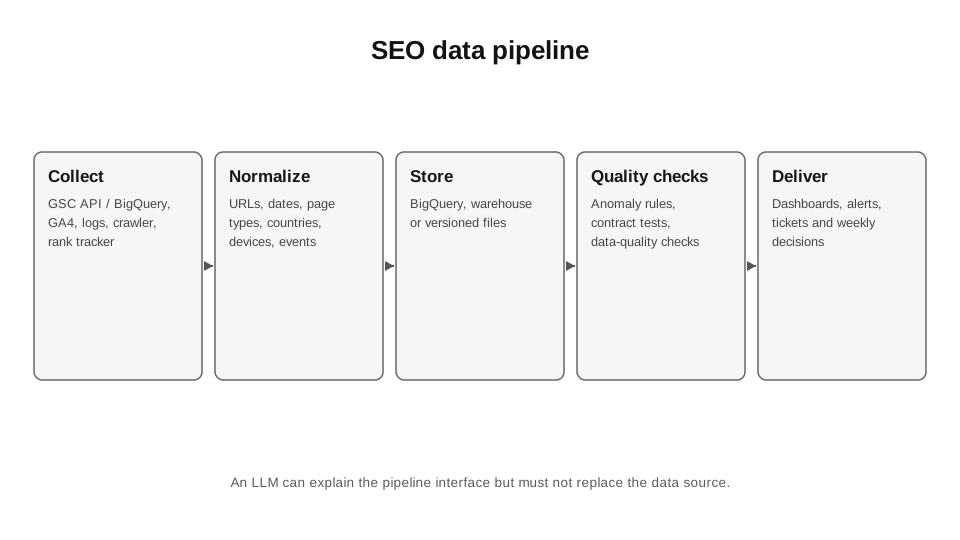
Automate repetitive, deterministic operations, not thinking itself. Strong SEO automation collects facts, normalises them, detects deviations and leaves decisions to people.
Data and sources as of: September 14, 2026
Most SEO teams start with spreadsheets. That is normal. The problem begins when a spreadsheet becomes a manual data pipeline: every Monday, someone downloads GSC data, pastes in GA4 data, copies rankings, updates VLOOKUP, colours cells red and posts a screenshot in Slack. This kind of “reporting” is expensive, fragile and not reproducible.
For me, automation has three criteria: the operation repeats; the inputs and outputs can be formally defined; automation errors are visible and controllable. Strategic prioritisation, interpretation or content judgement can use automated suggestions, but must not disappear behind `if/else`.
30.1. What to automate first
I start with tasks that involve the most manual copying: exports, URL normalisation, regular comparisons, template checks, anomaly detection. Next come page type classification, query mapping and internal-link suggestions. Only then do I move on to generative tasks.
Good automation should save senior staff time, not create another dashboard that nobody reads. Before development, I calculate minutes per run × runs per month × loaded cost. If a script saves 40 minutes once a quarter, maintaining it may cost more.
30.2. GSC: UI, API and BigQuery are different modes
The Search Console UI is convenient for manual diagnostics, the API for controlled queries and integrations, and bulk export for comprehensive historical analysis in BigQuery. Google documents that the Search Analytics API defaults to 1,000 rows, supports a `rowLimit` of up to 25,000 and pagination through `startRow`; the upper limit of data available through the API has been described as up to 50,000 rows per day per site and search type.[1][2]
Bulk export exports performance data to BigQuery daily without a daily row limit, but anonymised queries are excluded for privacy reasons.[3] This makes bulk export a better foundation for a warehouse and long-term trend analysis, if the volume justifies BigQuery.
30.3. GA4 is not a replacement for GSC
GSC measures interactions with Google Search; GA4 measures behaviour after your site loads. Because of differences in definitions, time zones, canonicalisation, privacy and tracking coverage, the figures should not match 1:1. Google explicitly recommends using both sources together and, for maximum granularity, combining bulk exports in BigQuery.[4]
Automation must preserve source semantics. You cannot create a “single source of truth” simply by adding GSC clicks and GA sessions into one column. They are different events.
30.4. The data schema matters more than the tool
It is easy to move a bad pipeline from Excel to Python and end up with automated chaos. Before writing code, I define canonical dimensions: `date`, `site`, `url`, `page_type`, `country`, `device`, `query_cluster`, `channel`, `event`. Each source is then mapped to this schema.
URL normalisation must be deterministic: protocol, host, trailing slash, parameters, case, fragments. If the crawler and GSC identify the same page differently, joins will produce false “missing URLs”.
30.5. Anomaly detection without magic
Not every -20% WoW change is an incident. I compare against day of the week, seasonality, a rolling baseline and update dates. In the early stages, simple rules are often better than a complex ML model: if clicks fall >30% YoY in a page type with a >10k baseline and impressions also fall, create an alert; if clicks fall but impressions are stable, check CTR/SERP.
An alert must lead to action. If a team receives 200 notifications a day, the system automatically trains people to ignore them.
CODE 30.1. A simple anomaly check between two GSC exports.
# Compare two GSC CSV exports by URL.
# Expected columns: page, clicks, impressions.
import pandas as pd
old = pd.read_csv("gsc_old.csv")
new = pd.read_csv("gsc_new.csv")
# Aggregate for multiple rows per URL.
def prep(df):
 return (df.groupby("page", as_index=False)[["clicks", "impressions"]]
 .sum())
a = prep(old).rename(columns={"clicks":"clicks_old", "impressions":"imp_old"})
b = prep(new).rename(columns={"clicks":"clicks_new", "impressions":"imp_new"})
m = a.merge(b, on="page", how="outer").fillna(0)
# Relative change. Leave NaN for zero baseline.
m["click_change"] = (m.clicks_new - m.clicks_old) / m.clicks_old.replace(0,
pd.NA)
m["imp_change"] = (m.imp_new - m.imp_old) / m.imp_old.replace(0, pd.NA)
# Example threshold: old baseline >= 100 clicks and drop >= 30%.
alerts = m[(m.clicks_old >= 100) & (m.click_change <= -0.30)]
alerts.sort_values("click_change").to_csv("gsc_alerts.csv", index=False)
print(alerts.head(30))
30.6. Orchestration
Once there are more than three scripts, you need a scheduler and an execution log. This can be GitHub Actions, Cloud Run/Functions, cron, Airflow, Make/n8n—the tool depends on the scale. Retries, timestamps, input versions, output locations and alerts on failure matter.
I store raw data separately from transformed data. If the calculation logic changes, the raw data allows me to rebuild the history. If you keep only the final Excel file, changing a formula makes previous months incomparable.
30.7. Versioning SEO logic
Regex, page-type rules, redirects, schema generators, prompt templates — these are code or configuration, which means they belong in version control. Git answers the question “who changed the rule and when”, rather than simply providing the latest file in Drive.
For critical changes, I add test cases. For example, a page classifier has a list of 50 URLs with their expected types. If a new regex rule suddenly classifies `/casino/brand/review/` as a category, the test will fail before it reaches production.
30.8. LLMs as an interface to data
An LLM can generate SQL, explain an anomaly, and turn a natural-language question into a query. But a production pipeline should not depend on the model “remembering” the schema. I provide the schema, permitted tables, examples and constraints, and the SQL goes through validation.
Irreversible actions — changing redirects, deleting URLs, publishing — require human approval. AI can prepare a diff, but it must not automatically “clean up junk” if there is no formal definition of junk.
30.9. Secrets and access
API keys, service-account JSON and database passwords must not be stored in code or prompt history. Use secret storage, environment variables, minimal permissions and rotation. This is particularly important when an LLM has access to files or repositories.
SEO automation quickly becomes part of production infrastructure. It needs the same protection as other internal tools, rather than being treated as “a marketer’s harmless little script”.
30.10. What an SEO Lead should automate
My priorities: data collection, monitoring, recurring audits, changelogs, anomaly detection, content inventory, link inventory, indexing segmentation and release QA. I do not automate final decisions on intent, brand positioning, risk acceptance and budget simply because it is possible.
The best outcome of automation is that the team spends less time extracting numbers and more time formulating hypotheses and testing decisions.
Sources for Chapter 30
1. Google Search Console API. Query Search Analytics data. https://developers.google.com/webmaster-tools/v1/how-tos/search_analytics — Pagination and rowLimit.
2. Google Search Central Blog. Performance data deep dive. https://developers.google.com/search/blog/2022/10/performance-data-deep-dive — API limits and the nature of the data.
3. Google Search Central Blog. Bulk data export. https://developers.google.com/search/blog/2023/02/bulk-data-export — Daily BigQuery export without a daily row limit; anonymised queries are excluded.
4. Google Search Central. Search Console + Analytics. https://developers.google.com/search/docs/monitor-debug/google-analytics-search-console — Combined analysis of the sources.