On a site with hundreds of thousands or millions of URLs, SEO stops being a set of page checks. The units of management become the page type, template, inventory segment and flow of changes.
Data and sources as of: September 14, 2026
A large site does not break because it has “too many pages”. It breaks when the team does not know which URLs exist, why they exist, who creates them, how they are linked, which ones Google should process and how quickly a widespread regression can be detected. On a 300-page site, you can open a page manually. On a 30-million-page site, you need systems.
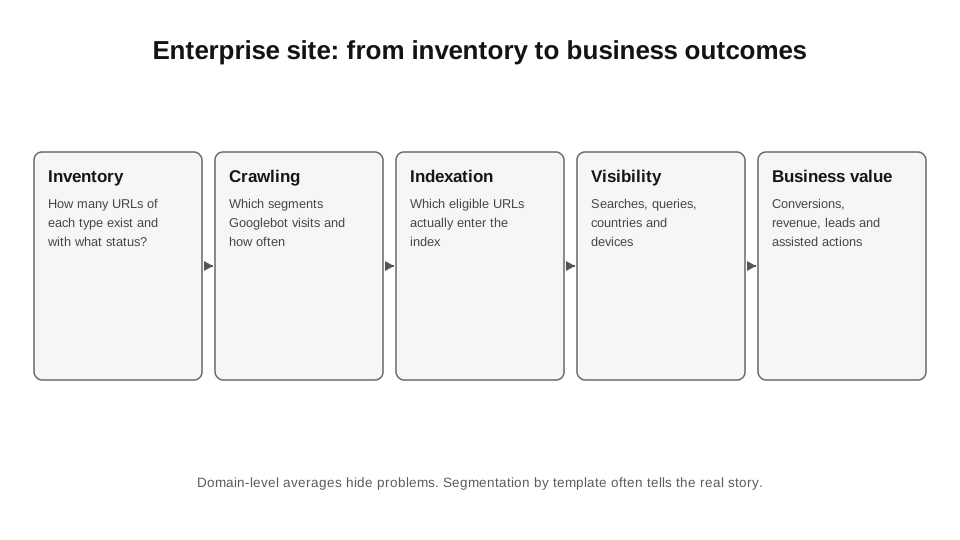
My basic unit of analysis is the page type. Product, category, filter, brand, article, location, profile, result page, discontinued item, pagination. For each type, I want to know the inventory, crawl behaviour, indexing, visibility, conversion and owner. If a dashboard cannot answer this within 5 minutes, the site is not yet being managed as a large site.
28.1. URL inventory
The first artefact for a large site is not a crawl export, but a URL inventory. I collect all sources: internal crawl, sitemap, CMS/database, Search Console, server logs, analytics, redirects. Then I normalise the URLs and classify them by page type and business status.
This reveals categories that no single source can show: a URL exists in the database but has no internal links; Googlebot visits a URL that is no longer in the sitemap; a page receives traffic, but the CMS considers it discontinued; a redirect persists for years even though no internal links point to it anymore.
28.2. Page type as a contract
For each template, I document a contract: expected HTTP status; whether it is indexable; canonical; robots directives; sitemap inclusion; structured data; internal link sources; expected content components; target country/language; primary conversion event. This allows automated testing of rules rather than “the site”.
If a product page suddenly starts serving `noindex` because of a release error, 200 random URLs in QA may not catch the regression. A contract test on a representative sample of each template catches it before it scales.
| Field | Category | Product | No-demand filter |
|---|---|---|---|
| HTTP | 200 | 200 | 200 or no URL |
| Indexability | yes | yes | no |
| Canonical | self | self | to the category, or the URL is not created |
| Sitemap | yes | yes | no |
| Internal links | menu/parent | category/brand | no crawl path created |
| Schema | as needed | Product | usually not |
28.3. Faceted navigation
On large ecommerce/marketplace sites, filters are the most common cause of URL explosion. Google explicitly identifies faceted navigation as the most common source of overcrawling complaints seen by the Search team.[1] The problem is not filters as a UX feature, but the fact that every combination can become a crawlable URL.
I divide facets into three groups: indexable landing pages with proven demand; crawlable but non-indexable technical states, if the product needs them; and states that should not create a separate URL for the crawler at all. The main mistake is allowing the frontend to generate a full combinatorial graph and then trying to “fix SEO” with canonical tags.
28.4. Sitemap sharding
On large sites, sitemaps should be used as measurement segments. I split files by page type, country, language and sometimes lifecycle. Page indexing / API / custom monitoring can then be mapped to a specific inventory.
Sitemap files should not become an archive of every URL that has ever existed. They should describe the current canonical set of URLs the team wants to see in search. Otherwise, the submitted metric mixes active pages with redirects, noindex and 404s.
28.5. Logs: actual crawling
Search Console Crawl Stats provides useful aggregate data, but logs answer questions at the URL level: exactly what the bot requested, when, with what status, how many bytes were returned and how long the server took to respond. On a large site, this is the only way to see, for example, that Googlebot spends 35% of its requests on parameterised URLs the team does not consider important.
You cannot blindly trust the User-Agent. For serious analysis, bots must be verified according to Google’s recommendations before calculating crawl frequency. Otherwise, “Googlebot” in the logs may be a third-party scraper.
28.6. Indexing segments
What interests me is not “Google has 2.3 million pages”, but the proportion of eligible URLs by type. 90% indexation for products and 15% for category landing pages is a very different problem from a uniform 60% across the entire site.
I build a funnel: inventory → eligible → discovered → crawled → indexed → impressions. If the drop-off is between discovered and crawled, I look at crawl demand/architecture. If it is crawled → indexed, I look at canonical/duplication/quality/soft 404. If it is indexed → impressions, the problem is already in retrieval/relevance/competition, not “indexing”.
28.7. Template regression monitoring
Large sites often lose SEO performance not because of a “Google update”, but because of a release. A React component removed `<a href>`, the CMS added noindex, the canonical started pointing to a staging domain, JSON-LD stopped including price, hreflang generates 404s. One deployment can affect millions of URLs.
That is why I maintain synthetic SEO tests in CI/CD, or at least hourly monitoring of representative URLs. The minimum: status, robots, canonical, hreflang, title, H1, body presence, key structured data properties, internal links, render result. In production, I add alerts only for changes that have an impact at scale.
28.8. Inventory pruning
A large site naturally accumulates discontinued products, empty categories, old campaigns, profiles without content, query pages and duplicates. But mass “pruning” without a dependency map can wipe out pages that pass internal link equity, have backlinks or attract seasonal demand.
I make decisions by class. If a product has been permanently discontinued and has no equivalent, 404/410 may be appropriate. If there is a clear successor, redirect. If a category is temporarily empty, the decision depends on the likelihood of inventory returning and the page’s usefulness. If a URL has no demand, data, links or role in navigation, it is often better not to maintain it.
28.9. Team productivity
On a large site, a manual SEO audit is sampling. It is necessary, but it is not a control system. I automate what is deterministic: extraction, classification, comparisons, contract tests, anomaly detection. Humans remain responsible for diagnosis, prioritisation and decisions involving ambiguous trade-offs.
The key metric for an SEO team on a site like this is not the number of “issues” found, but the time from regression to detection and from detection to resolution. An incident that affected 2 million URLs for 10 minutes is almost always less costly than a “minor canonical bug” that persisted for six weeks.
28.10. Data as a warehouse, not a collection of CSVs
Beyond a certain scale, Excel stops being the source of truth. I bring Search Console bulk export, analytics, logs, inventory and crawler output together in a warehouse. Google explicitly recommends BigQuery exports for detailed joint analysis of Search Console and GA when maximum granularity and minimal discrepancies are needed.[2]
There is no need to build a data platform “because it is fashionable”. The threshold is simple: if the same table is assembled manually every week, if history is lost, if different people calculate a metric differently, it is time to formalise the pipeline.
Sources for Chapter 28
1. Google Search Central Blog. Crawling December: Faceted navigation. https://developers.google.com/search/blog/2024/12/crawling-december-faceted-nav — The risk of a combinatorial URL space and overcrawling.
2. Google Search Central. Using Search Console and Google Analytics data for SEO. https://developers.google.com/search/docs/monitor-debug/google-analytics-search-console — Joint analysis and BigQuery exports.
3. Google Search Central. Ecommerce site structure. https://developers.google.com/search/docs/specialty/ecommerce/help-google-understand-your-ecommerce-site-structure — The internal link graph.
4. Google Search Central. Ecommerce URL structure. https://developers.google.com/search/docs/specialty/ecommerce/designing-a-url-structure-for-ecommerce-sites — URLs, canonicals, filters, pagination.