How to distinguish the HTTP response from the DOM after JavaScript, when rendering actually breaks SEO, why a screenshot does not equal indexed HTML, and how to test JavaScript sites without rituals or myths.
Data and sources as of: September 14, 2026
Rendering is often confused with three different things at once: loading HTML, executing JavaScript, and what ultimately makes it into the index. As a result, diagnosing JavaScript sites quickly turns into magic: the page opens in Chrome, so Google can see it; or conversely - the content appears through JavaScript, so it must be moved to the server. Both conclusions are too crude.
In 2026, Google explicitly reminds us that the mere use of JavaScript is no longer valid shorthand for “Google finds the site harder to process”. In March, Google removed an outdated section from its documentation, explaining that Search has been rendering JavaScript for many years.[6] But this does not mean architecture is irrelevant. It determines when content, links, canonical, robots, structured data and other signals appear; how many external resources need to be fetched; whether user interaction is required; and whether an API can work without cookies, localStorage or permission.
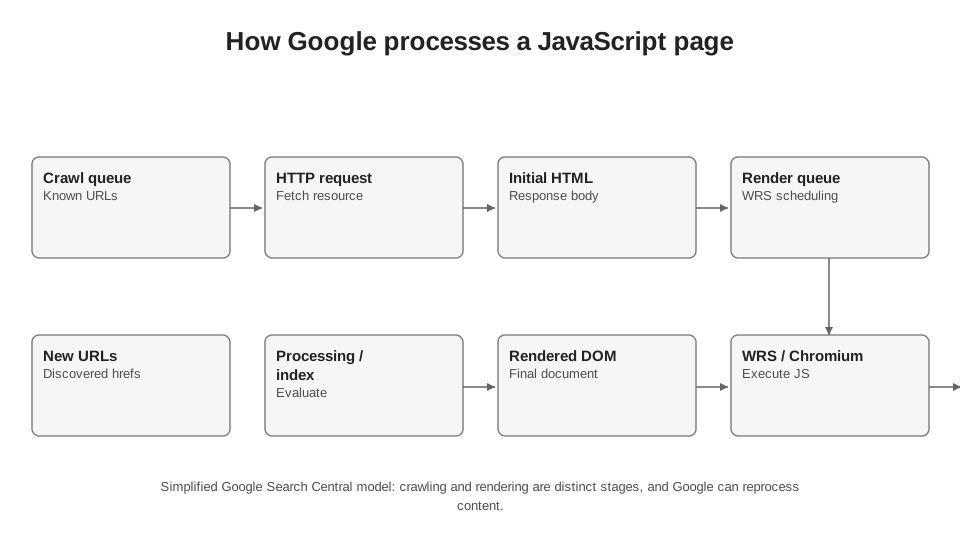
Author’s diagram based on Google Search Central. Google does not publish its exact internal formula for prioritising the rendering queue.
7.1. Rendering is not a “second crawl” or a guarantee of indexing
The first useful distinction is between the network and browser layers. During an HTTP request, the server returns a status, headers and a response body. On a conventional server-rendered page, the main text, links and SEO metadata are already present in this HTML. In a client-side application, the response may contain only a shell, JavaScript bundles and a container into which content will be inserted later.
Googlebot first fetches the HTTP response itself and can already extract available <a href> links from it. Next, a page returning 200 may reach the Web Rendering Service, where headless Chromium executes JavaScript. Google then obtains a different representation of the document - the DOM after script execution - and looks for content and links again.[1]
An important detail: a non-200 response may not undergo full rendering at all.[1] JavaScript should therefore not be a way to “fix” basic HTTP semantics. If a page does not exist, it is better to return a correct 404/410; if it has moved - a server-side redirect; if access is restricted - the appropriate 401/403. Google supports JavaScript redirects, but Google itself recommends using them only when a server-side or meta refresh option is not possible, because a JavaScript redirect depends on successful rendering.[10]
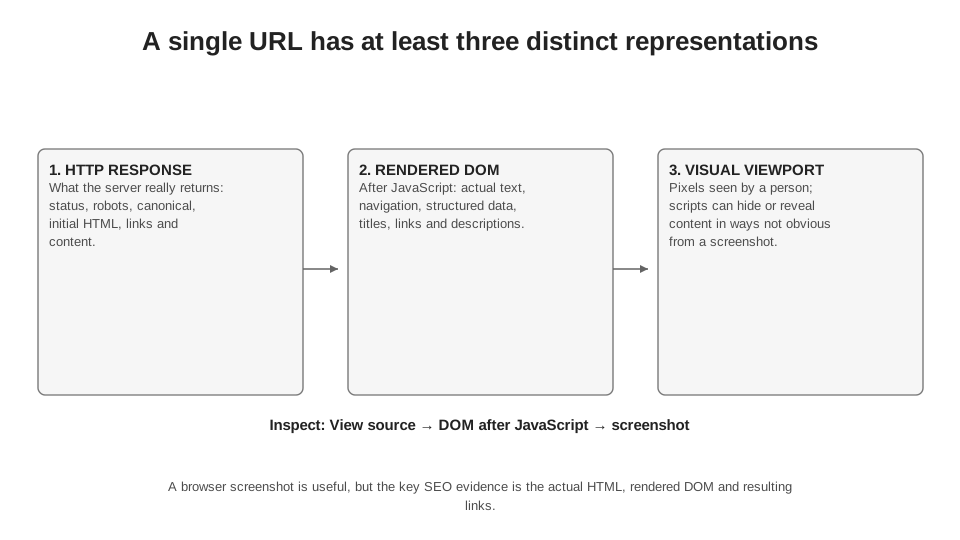
A screenshot is useful for diagnosis, but the primary technical evidence that text or a link exists is the rendered HTML/DOM, not the pixels.
| Layer | What We Check | What it proves | What it does not prove |
|---|---|---|---|
| HTTP response | status, HTTP headers, source HTML, robots, canonical, links | what the server actually returned before JavaScript execution | that Google successfully executed JavaScript and used the result |
| DOM after JavaScript | text, href, title, meta, JSON-LD, elements after API calls | what the browser was able to construct after script execution | that this exact state is stored in the index |
| live test in Search Console | rendered HTML, screenshot, resources, JavaScript console | that the current version of the page is accessible to the inspection tool right now | the Google-selected canonical, or that this exact version has already been indexed |
| Indexed version | URL Inspection data on the latest version known to Google | what Google stored after an actual crawling and indexing cycle | that today’s current version is identical |
7.2. All pages returning 200 enter the rendering queue - but that is no argument for doing everything through JavaScript
Google’s current documentation contains a statement that often surprises even experienced SEOs: all pages returning HTTP 200 are queued for rendering, regardless of whether they contain JavaScript.[1] This does not mean that SSR and CSR architectures are equivalent for Search. The difference lies in how much useful information Google already has at the first stage and how many critical elements depend on subsequent resource execution.
If the main text, heading, navigation, canonical and JSON-LD are present in the initial HTML, rendering primarily supplements the document. If the initial HTML is an empty shell, successful rendering becomes a prerequisite for almost everything SEO needs from the page to appear. In the second case, the number of failure points increases: the JS bundle, API, network rules, resource blocking, runtime errors, client state, authentication, experiments and dependence on external services.
7.3. SSR, SSG, hydration and CSR: for SEO, what matters is not the fashionable acronym, but where critical content appears
I do not judge a framework by its name. Next.js can be configured so that a product page returns complete HTML, or the main catalogue can be moved into client-side requests. React itself makes a site neither SEO-friendly nor SEO-unfriendly. For an audit, the more important questions are: what is in the HTTP HTML; what appears after JavaScript runs; what changes during hydration; and what depends on user state.
In an article updated on January 5, 2026, web.dev defines SSR as generating HTML on the server, CSR as creating the DOM in the browser using JavaScript, prerendering as preparing static HTML at build time, and hydration as adding client-side state and interactivity to already rendered HTML.[8] For SEO, these definitions are useful not as a ranking of technologies, but as a map of dependencies.
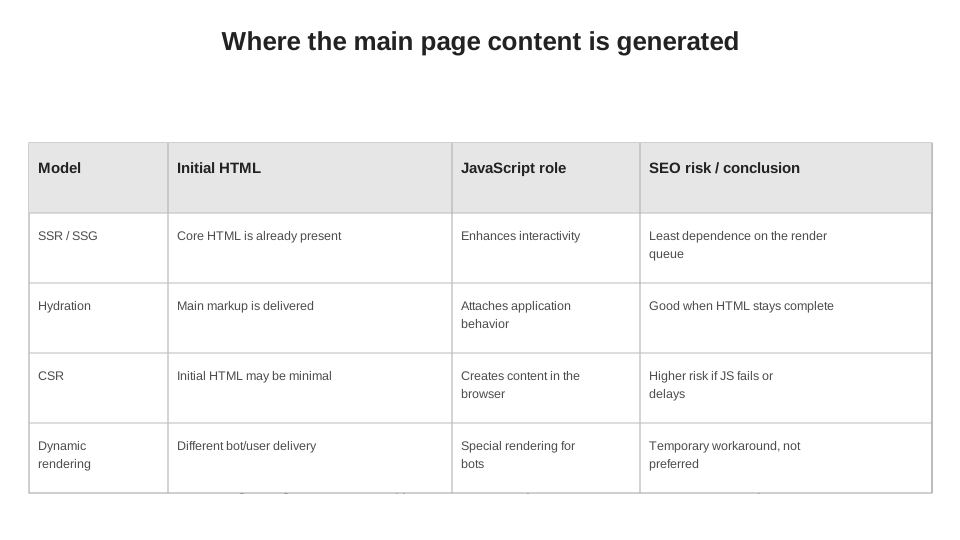
Dynamic rendering is shown separately in the diagram because Google considers it a temporary workaround, not a recommended long-term architecture.[4]
| Architecture | Core Content in HTTP HTML | Reliance on JavaScript for SEO | Practical Comment |
|---|---|---|---|
| SSG / static generation | yes | low | a strong foundation for content and catalogue pages; JavaScript can remain for interactivity |
| SSR | yes | low or medium | SEO-critical data is available immediately, but server response time and caching still matter |
| SSR + hydration | yes | medium | HTML is present, but after hydration you need to check whether the DOM incorrectly changes the canonical, content or links |
| CSR | often partially or not at all | high | the main content depends on JS, APIs and WRS; requires a separate rendering check |
| Dynamic rendering | versions for bots and humans differ | artificially reduced for the bot | Google calls this a workaround; it is better to fix the architecture through SSR, static rendering or hydration |
7.4. Which SEO elements I do not want to leave to “getting lucky after JS runs”
Technically, Google can see many things added by JavaScript. The documentation explicitly allows changing the title and meta description, injecting JSON-LD and even a canonical.[1] But “can process it” and “this is the most reliable architecture for a critical signal” are different questions.
For templates where SEO is an important part of the business, I try to have at least the page’s main content, a logical H1, crawlable links, basic robots/canonical signals and structured data describing already visible content in the initial HTML. This is not a Google requirement that “everything must be SSR”; it is an engineering strategy for reducing the number of dependencies.
| Element | Can Google fetch after JS? | What do I check | Safer default |
|---|---|---|---|
| Main text | yes | whether it is present in the rendered HTML without a click/login/scroll-event | have key text in the HTML or ensure it loads without interaction |
| Internal links | yes, if they are <a href> elements in the DOM | presence of a real href after rendering | key navigation in the HTML |
| title / meta description | yes | whether they are overwritten with a template or empty value | generate correctly on the server |
| canonical | yes | conflict between the HTTP HTML and the rendered DOM | one stable value; preferably in the HTML |
| robots meta | yes, but there is an important noindex trap | whether noindex is mistakenly present in the initial HTML | do not put noindex in the initial HTML of a page that should be indexed |
| JSON-LD | yes | whether it describes visible content and is present in the rendered HTML | server-side or stable client-side output |
7.5. The noindex trap: JavaScript will not always get a chance to “change its mind”
One of the most dangerous patterns is serving noindex in the initial HTML and then removing it with JavaScript once the API confirms that the page is valid. Google explicitly warns that when it encounters noindex, rendering and JavaScript execution may be skipped. This makes the logic of “noindex first, then JavaScript will make it index” unreliable.[1]
The reverse scenario is more acceptable: the page starts without noindex, and JavaScript adds noindex if the API returns a state that should not be indexed. But for templates used at scale, I still prefer the correct HTTP status or server-side logic. Especially for products, job listings and entity pages, where the business already knows on the server whether something “exists / does not exist”.
7.6. Content that appears after a click, a scroll or user permission is a different class of risk
Google Search does not interact with a page like a person. The official documentation on lazy loading explicitly states that the implementation must not rely on user actions such as scrolling or clicking.[3] In its troubleshooting guide, Google also notes that features requiring permissions may be pointless for Googlebot: it will not grant a site camera access just to obtain the main content.[2]
The important distinction, therefore, is not “JavaScript / no JavaScript”, but “generated automatically during rendering / appears only after a separate interaction”. If text is revealed by a click handler, a list loads only on a scroll event, an API requires a cookie from a previous session or content sits behind a permissions API, a normal user check in a browser can mislead an SEO specialist.
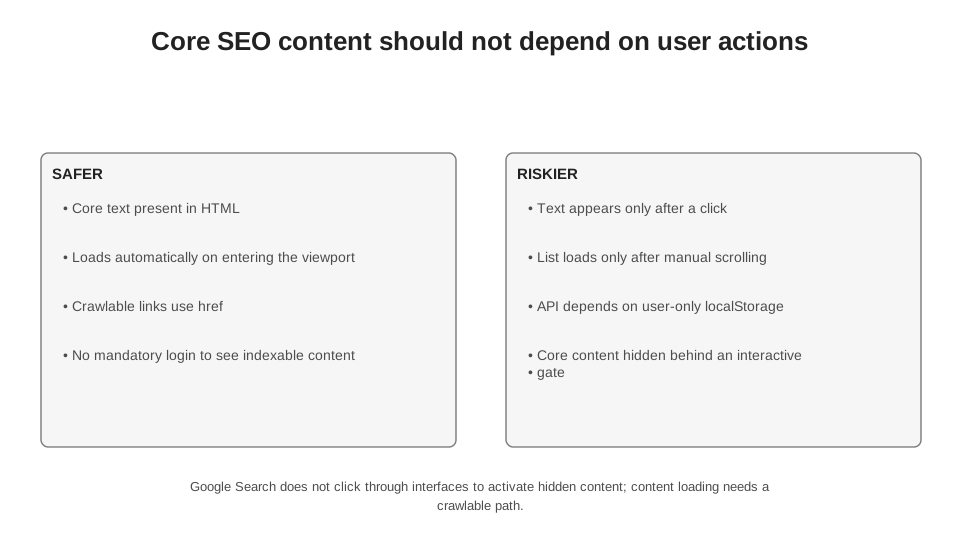
Google Search does not “click through” an interface to reveal hidden main content. Lazy loading requires content to appear automatically when it becomes visible in the viewport.[3]
| Dependency | What a human sees | Risk for Google | What to do |
|---|---|---|---|
| clicking “Show more” | content after a click | main content may not appear during rendering | do not make critical text depend solely on a click handler |
| scroll event | elements after manual scrolling | Google does not interact with a page like a person | IntersectionObserver or native browser lazy loading; test the rendered HTML |
| cookie / localStorage | content after a previous session | WRS does not retain state between page loads[2] | provide a functional initial state without stored browser state |
| login | personalised content | Googlebot does not authenticate like a regular user | public SEO content must be accessible without logging in |
| Camera/permissions API | content after permission is granted | Googlebot does not grant required user permissions[2] | do not make permission a prerequisite for the main indexable content |
7.7. Lazy loading and infinite scroll: the problem is not the technique, but inaccessible HTML
Lazy loading is not an SEO mistake in itself. Google recommends it for resources that are not visible or are non-critical, but on one condition: relevant content must load when it enters the viewport, without requiring a manual click or scroll as a trigger.[3] For images and iframes, the simplest option is native browser lazy loading; for other scenarios, Google points to IntersectionObserver.
Infinite scroll has a separate requirement. Each logical segment must have a persistent, unique URL, the same content when reopened and sequential, crawlable links between pages. When a new segment becomes the main one during scrolling, the URL can be updated using the History API.[3] This is no longer a cosmetic technique: without standalone URLs and pagination, the crawler gets only a single endless interface with no stable addressing.
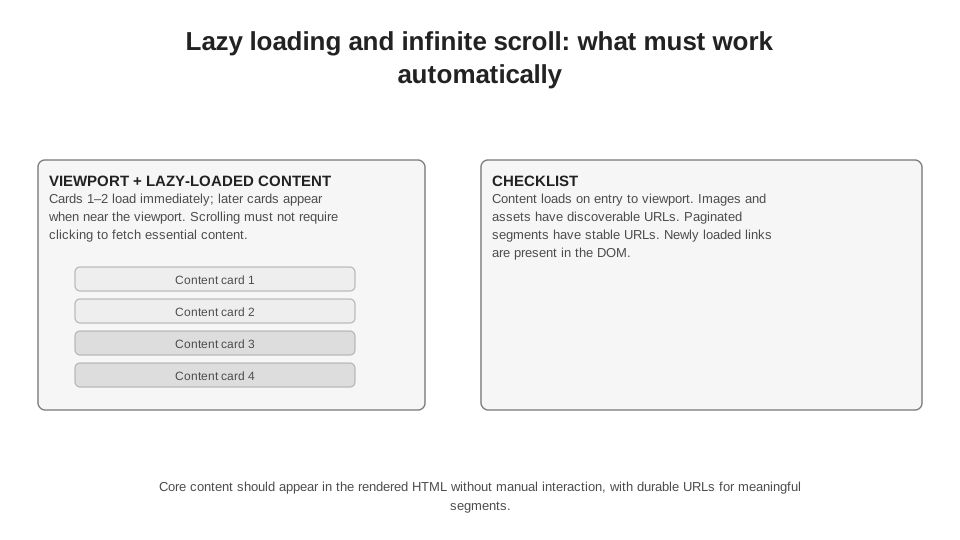
The criterion is not “can a person see this after scrolling”, but “do the content and its URL appear in the rendered HTML without mandatory manual interaction”.
7.8. JavaScript and CSS resources: rendering can fail outside the HTML
When a page returns the correct 200 status and sufficient HTML, but the live test shows an incomplete DOM, I look at the resources. WRS may fail to fetch a JavaScript bundle because of robots.txt, a CDN/WAF, host errors, different behaviour for the bot identifier or an external API. Google also states that WRS analyses resources and may skip loading those not needed for the main content, such as some analytics or error-reporting requests.[2]
Another less obvious problem is caching. Googlebot caches resources aggressively, and WRS may ignore caching headers. If main.js changes but its URL stays the same, Google may use an older version for some time. Google recommends content-based filename versioning: the filename changes along with its content, for example main.2bb85551.js.[1]
| Symptom | First check | Typical cause | Evidence |
|---|---|---|---|
| HTML is present, DOM is empty | network requests / page resources | JavaScript bundle failed to load or returned 4xx/5xx | the specific resource with the error |
| some data is missing | JavaScript console + API requests | CORS, authentication, cookies, rate limiting, blocked endpoint | error in the console or a network request |
| Google sees an old version of the UI | resource URLs and content-based versioning | the same JS/CSS URL despite content changes | JavaScript bundle versions in network logs |
| everything works locally, but not in the live test | WAF/CDN/robots for resources | different policy for the crawler’s IP/UA | resources in the live test + server/CDN logs |
| analytics request is missing | whether it is needed for the content | WRS may skip non-essential requests | do not treat this as a rendering defect unless content is lost |
7.9. Canonical, title and structured data after JavaScript: technically possible, but conflicts need to be caught
Google supports JavaScript changes to title and meta description, and can read JSON-LD and canonical tags added through JavaScript.[1] But canonical comes with a specific caveat: if a canonical is present in the initial HTML, JavaScript must not change it to a different URL. If the server cannot set a canonical, it can be added through JavaScript, but without creating a conflict between two values.[1]
In a practical audit, I compare not just “canonical present / absent”, but three states: the HTTP HTML, the DOM after JavaScript and what Search Console reports as the user-declared canonical / Google-selected canonical. If the first two already conflict, there is no point looking for a complex algorithmic reason why Google chose the wrong URL.
| Signal | HTTP HTML | DOM after JS | SEO conclusion |
|---|---|---|---|
| canonical A | A | A | stable implementation |
| canonical A | B | B | implementation conflict; JS overwrites the signal |
| absent | A | A | Google can process it, but the signal depends on rendering |
| templated title | unique title | unique | can work, but a rendering error leaves a weak fallback |
| JSON-LD absent | JSON-LD present | valid | supported; test the rendered result |
7.10. Shadow DOM and web components: Google does not see the same thing as “View Source”
Google documents support for web components: during rendering, it “flattens” the light DOM and shadow DOM into the rendered HTML. The practical criterion is simple: if the required content is not visible in the rendered HTML, Google will not be able to index it.[1] That is why checking only View Source is not enough for a site built with web components.
This is a good example of a broader problem: View Source shows the HTML received from the server, while Elements in DevTools shows the browser’s current DOM. For a conventional page, they are similar; for a complex client-side application, they can differ radically. In an audit, you need to know exactly which layer you are looking at.
7.11. URL Inspection: the most useful checkpoint for a specific URL, but not an oracle
URL Inspection combines two data sources: information from Google’s index and live test data. The indexed version shows what Google knows about the page after its crawling and indexing cycle. The live test is generated separately at the time of testing and is useful for diagnosing the current state, but does not predict, for example, which canonical Google will actually select during indexing.[5]
The live test lets you view a screenshot, HTML, HTTP headers, the JavaScript console and loaded resources.[5] This is a powerful toolset for a rendering audit. But I do not conclude that “everything is fine” from the screenshot alone: a screenshot is a visual snapshot. Text may be further down, an element may be present in the HTML but outside the visible frame, or conversely, the interface may look similar while a critical link lacks a crawlable href.
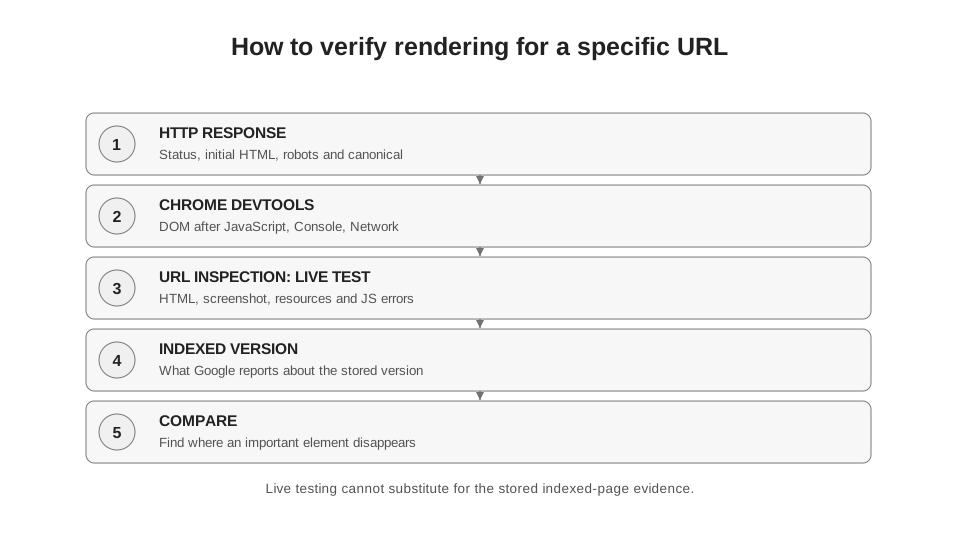
The live test and indexed data answer different questions. Google does not use the live test result as the indexed version of the page.[5]
| Tool | What I see | Strength | Limitations |
|---|---|---|---|
| curl / raw response | status, HTTP headers, HTML | shows the exact server response | does not execute JavaScript |
| Chrome DevTools | DOM, network requests, console | quickly pinpoints JavaScript, API or resource errors | a regular browser environment, not Google |
| URL Inspection live test | rendered HTML, screenshot, resources, console | checks the current URL using Google’s tool | is not index data and does not predict the canonical Google will select |
| URL Inspection indexed data | last crawl, indexing status, canonical | actual state in Google’s system | may predate the current release |
| server/CDN logs | actual resource requests | event-level evidence of access | do not show whether the DOM was built correctly |
7.12. How I check a single URL in 10-15 minutes
I do not start with “the site runs on React”. First, I record the specific symptom: missing text, links, canonical, structured data, images, pagination or the entire template. Then I work from the lowest layer to the highest.
First, I look at the HTTP status and initial HTML. If the element is already absent there, that is not yet a defect, but I already know it depends on the next stage. Then I open DevTools: has the element appeared in the DOM, which requests created it, are there errors in the console? After that, I run the live test in Search Console and check the rendered HTML, resources and screenshot. Only then do I compare the indexed version, so as not to confuse the current version of the site with the state Google stored earlier.
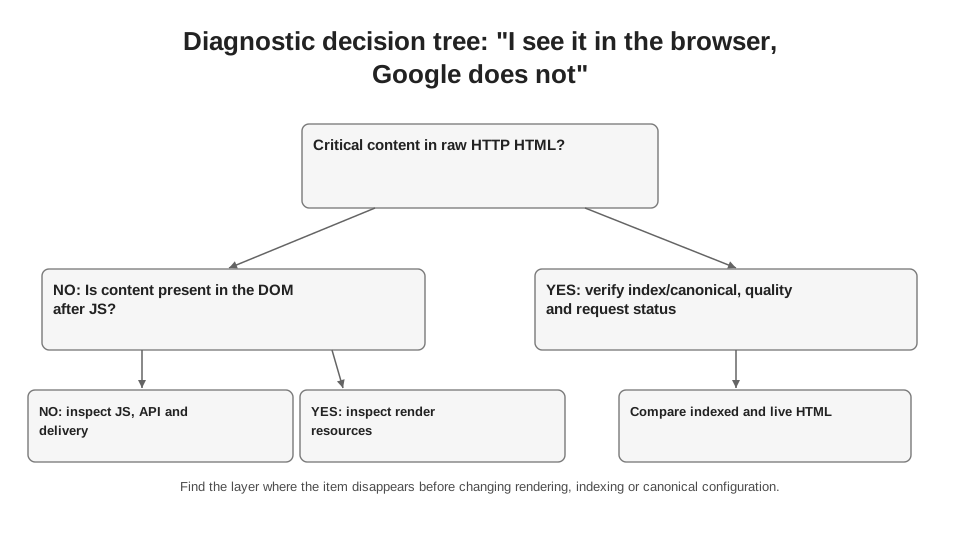
Start with the layer where the element disappears: HTTP HTML, the DOM after JS, the live test or the already indexed version.
7.13. Auditing at scale: compare templates, not 100,000 URLs manually
For a large site, checking rendering one URL at a time is pointless. I first build a typology: product, category, article, landing page, pagination, filter, profile and so on. For each type, I select several representative URLs in different states: new, old, with little content, with extensive content, with zero results, with pagination. I then check whether the same rendering discrepancy recurs across the template.
For bulk crawling, it is useful to compare Text Only and JavaScript Rendering modes. Screaming Frog lets you run both modes and export title, meta robots, canonical, H1, link counts, structured data and custom extraction. The question “do we have a JavaScript problem?” then becomes a table showing “exactly which fields change after rendering, and on which URL types”.
Formula 7.1. Rendering dependency ratio for SEO elements.
This is the author’s internal diagnostic indicator, not an official Google metric. Its purpose is to compare templates and releases, not to “optimise a number for its own sake”.
Formula 7.2. Proportion of URLs with a critical rendering discrepancy.
A critical discrepancy may be missing main text, href, canonical, robots, title or structured data—the set must be defined before the test.
| Slice | Example of verification | What to segment |
|---|---|---|
| page type | product / category / article | individual templates |
| HTTP vs JS | title, canonical, robots, H1, text, internal links | field and URL type |
| resource errors | 4xx/5xx JS/CSS/API | host, JavaScript bundle, release |
| rendering time / timeout symptoms | complete vs incomplete DOM | template, device, release |
| indexed version vs current version | old DOM / new DOM | crawl date, release date |
7.14. Automation: comparing initial HTML with the DOM after JavaScript
Below is a minimal local test. It does not emulate Googlebot or replace URL Inspection. Its task is simpler: to show which basic SEO elements change between the HTTP response and the browser DOM after JavaScript. For a bulk audit in a production environment, I would add a URL list, User-Agent control, timeouts, resource error logging, custom selectors and saving the differences to CSV.
An alternative without Python: run two crawls of the same URL set in Screaming Frog—Text Only and JavaScript rendering—and match the exports by URL. For a single URL, the HTTP response + Chrome DevTools + a live test in Search Console are enough. Python is needed when the comparison must be repeated regularly or across a large sample.
Code 7.1. A minimal comparison of HTTP HTML and the browser DOM after JavaScript. Requires requests, beautifulsoup4 and playwright.
import sys
import requests
from bs4 import BeautifulSoup
from playwright.sync_api import sync_playwright

# Run: python render_compare.py https://example.com/page
url = sys.argv[1]

# 1) Get the original HTML without executing JavaScript.
raw_html = requests.get(
    url,
    headers={"User-Agent": "Mozilla/5.0"},
    timeout=30,
).text

# 2) Open the same URL in Chromium and wait for the network requests to complete.
# This is a local browser test, not a Googlebot emulation.
with sync_playwright() as p:
    browser = p.chromium.launch()
    page = browser.new_page()
    page.goto(url, wait_until="networkidle", timeout=60_000)
    rendered_html = page.content()
    browser.close()

# 3) Extract the minimum set of SEO elements from each version of the HTML.
def extract(html):
    soup = BeautifulSoup(html, "html.parser")
    canonical = soup.find("link", rel="canonical")
    robots = soup.find("meta", attrs={"name": "robots"})
    return {
        "title": soup.title.string.strip() if soup.title and soup.title.string else "",
        "h1": [x.get_text(" ", strip=True) for x in soup.find_all("h1")],
        "canonical": canonical.get("href") if canonical else "",
        "robots": robots.get("content") if robots else "",
        "links": len(soup.find_all("a", href=True)),
        "text_chars": len(soup.get_text(" ", strip=True)),
    }

print("RAW:", extract(raw_html))
print("RENDERED:", extract(rendered_html))
7.15. Dynamic rendering: do not confuse a temporary workaround with a current recommendation
In older JavaScript SEO guides, dynamic rendering often looks like a standard approach: serve pre-rendered HTML to bots and a client-side application to users. Google’s current position is different: dynamic rendering is a temporary workaround, not a long-term solution. Google recommends server-side rendering, static rendering or hydration.[4]
The reason is not just Google’s policy. Two versions of the same document have to be kept in sync; different caches, different errors and different canonical and content outputs emerge. If a team has no choice but to use dynamic rendering for a legacy system, I give it a finite lifespan and put checks in place to ensure parity between the bot version and the user version, rather than turning it into a permanent architecture.
7.16. JavaScript SEO myths to remove from your audit
| Myth | What is proven | Practical conclusion |
|---|---|---|
| “JavaScript itself makes SEO harder for Google” | In March 2026, Google removed the outdated wording: Search has been rendering JS for many years.[6] | Look for a specific dependency or failure scenario rather than blaming the technology as a whole. |
| “If a page opens in Chrome, Google sees the same thing” | WRS has a different context, does not retain state between page loads and does not grant required API permissions.[2] | Check the live test and the rendered HTML. |
| “A screenshot in Search Console proves that everything is being indexed” | A screenshot shows the visual result of the live test.[5] | For text, href, canonical and meta, check the HTML; for index status, check the indexed data. |
| “View Source = what Google sees” | Google may execute JS and analyse the rendered HTML.[1] | Compare the initial HTML with the DOM after JS. |
| “Dynamic rendering is the recommended approach for SEO” | Google calls it a workaround and recommends SSR, static rendering or hydration.[4] | Do not build two versions of the site into a new architecture as the default. |
| “noindex can safely be removed with JavaScript” | Google may skip rendering when noindex is present in the initial HTML.[1] | Do not serve noindex on a page that needs to be indexed in the hope of removing it with JS. |
7.17. What we know for certain and what remains unknown
We know for certain: Google crawls, queues pages returning 200 for rendering, executes JavaScript in modern Chromium, reanalyses the HTML after rendering and extracts links; it supports JavaScript changes to the title, meta description, canonical and structured data; Search does not interact with a page as a user would to trigger lazy loading; WRS does not preserve localStorage/sessionStorage between page loads; dynamic rendering is not a recommended long-term solution.[1][2][3][4]
What is not publicly known: the exact priority of a specific URL in the rendering queue, a guaranteed maximum waiting time, the exact internal WRS resource scheduling model, which resources the system will decide to skip during a particular render, and the full formula determining how the rendered document affects subsequent indexing. That is why I do not treat any “Google rendering limits” in seconds or any magic acceptable quantity of JS as fact unless they have a current official source.
7.18. Practical takeaway
JavaScript SEO in 2026 is not a separate, magical discipline. It is about controlling a document’s transitions between states. The server returned one version. After executing JavaScript, the browser produced a second. Google’s live test may show a third, current version, while the index may still hold the previous crawl. The SEO task is to identify the exact transition at which a critical element is lost.
My working standard is simple: everything critical to the page’s content, navigation and basic indexing signals must either be in the initial HTML or be guaranteed to appear in the rendered HTML without a click, scrolling, login, permissions or saved state. An audit starts with HTTP and the DOM, not the name of the framework. If an element is in the initial HTML - rendering is not its first problem. If it is absent from the initial HTML but present after JavaScript execution - we check Google’s live test next. If it is there too - we move on to canonical, indexing and quality rather than continuing to blame JavaScript.
Sources for Chapter 7
1. Google Search Central. Understand JavaScript SEO Basics. https://developers.google.com/search/docs/crawling-indexing/javascript/javascript-seo-basics Basics of crawling, the rendering queue, WRS, canonical, noindex, caching and web components.
2. Google Search Central. Fix Search-Related JavaScript Problems. https://developers.google.com/search/docs/crawling-indexing/javascript/fix-search-javascript WRS limitations, permissions, localStorage/sessionStorage, resources and diagnostics.
3. Google Search Central. Fix Lazy-Loaded Website Content. https://developers.google.com/search/docs/crawling-indexing/javascript/lazy-loading Lazy loading without manual interaction and indexable infinite scrolling.
4. Google Search Central. Dynamic Rendering as a workaround. https://developers.google.com/search/docs/crawling-indexing/javascript/dynamic-rendering Dynamic rendering as a temporary workaround; server-side/static rendering or hydration are recommended.
5. Google Search Console Help. URL Inspection tool. https://support.google.com/webmasters/answer/9012289?hl=en Live testing, screenshots, rendered HTML, resources and the JavaScript console.
6. Google Search Central. Latest Google Search Documentation Updates. https://developers.google.com/search/updates March 4, 2026: Google removed an outdated section, emphasising that Search has been rendering JavaScript for many years.
7. Google Search Central. In-Depth Guide to How Google Search Works. https://developers.google.com/search/docs/fundamentals/how-search-works JavaScript rendering during crawling and subsequent indexing.
8. web.dev. Rendering on the Web. https://web.dev/articles/rendering-on-the-web Updated January 5, 2026. SSR, CSR, prerendering, hydration and performance.
9. web.dev. Client-side rendering of HTML and interactivity. https://web.dev/articles/client-side-rendering-of-html-and-interactivity The impact of client-side rendering on the DOM and the browser’s main thread.
10. Google Search Central. Redirects and Google Search. https://developers.google.com/search/docs/crawling-indexing/301-redirects JavaScript redirects via WRS; preference for server-side redirects.
11. Google Search Central. Get started with Search: a developer's guide. https://developers.google.com/search/docs/fundamentals/get-started-developers JavaScript, semantic HTML, text in the DOM and URLs for SPAs.