What crawl budget actually means, when it becomes a problem, how Googlebot responds to the server, what Crawl Stats shows and how to move from Search Console aggregates to event-level log analysis.
Data and sources as of: September 12, 2026
Crawl budget is often discussed as though every site has a fixed daily Googlebot allowance that can be “spent” on good or bad pages. This is a convenient metaphor, but technically inaccurate. In Google's documentation dated July 22, 2026, the model is described differently: the actual volume of crawling is determined by the intersection of two things - the host's crawl capacity limit and crawl demand for specific URLs.[1]
The first answers the question “how much can Google fetch without causing problems for the server”. The second answers “how much does Google actually want to fetch”. If the server is fast and stable but demand is low, Google is under no obligation to increase crawl frequency. If demand is high but the host starts responding more slowly or returning 5xx or 429, the system reduces the load. Crawl budget is therefore neither a single control nor a single counter.
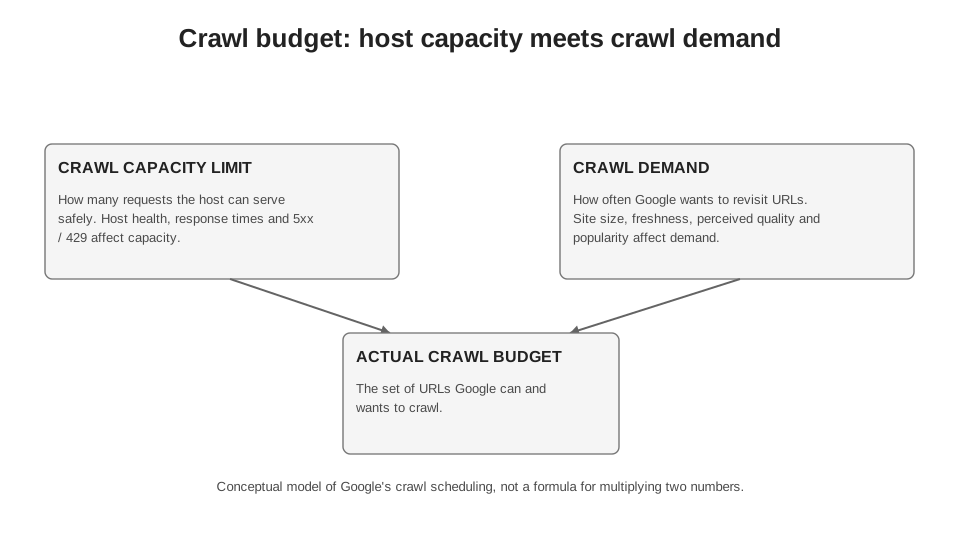
Author's diagram based on Google Crawling Infrastructure. This is a conceptual model, not a formula for multiplying two metrics.
6.1. When crawl budget warrants specific attention at all
For most small sites, crawl budget is not a separate SEO problem. Google explicitly states that if there are few pages, they do not change very quickly or new content is crawled the same day, maintaining a sitemap and regularly checking the Page Indexing report is enough. Google's separate advanced guide is aimed primarily at large and highly dynamic sites.[1]
The official guidelines are approximate, not hard thresholds: 1 million or more unique URLs with moderate changes roughly once a week; 10 thousand or more unique URLs with very rapid daily changes; or sites where a substantial proportion of URLs in Search Console have the status “Discovered - currently not indexed”.[1] Google itself specifically cautions that these numbers are intended for classification, not for a mathematical decision of “9,999 URLs - no problem, 10,000 - a problem”.
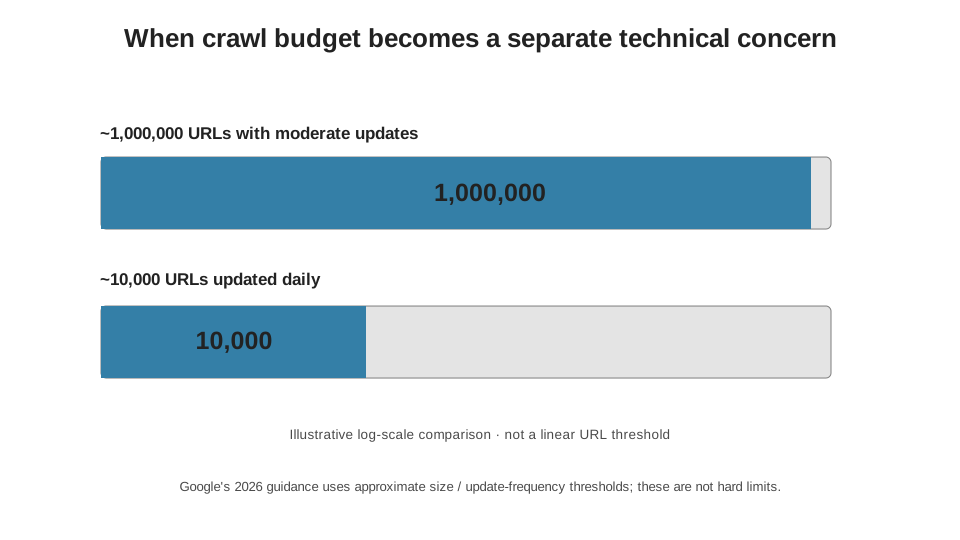
Source: Google Crawling Infrastructure, 2026. Google describes both thresholds as approximate.
| Situation | Should I start with crawl budget | What to check first |
|---|---|---|
| 800 static pages, new URLs are crawled quickly | Usually not | Page Indexing report, sitemap, internal linking, technical accessibility. |
| 50 thousand products, prices and availability change daily | Yes, it already makes sense | Logs, Crawl Stats, recrawl frequency, 304, response time, unnecessary parameterised URLs. |
| 2 million catalogue URLs, some templates barely change | Yes | URL inventory, duplicates, facets, soft 404s, recrawl demand. |
| 20 thousand pages, but thousands are “Discovered - currently not indexed” | Yes, as one hypothesis | Whether the problem lies in new URL discovery, demand, quality, URL inventory or host capacity. |
| A site with 5 thousand URLs after a migration | May be temporarily important | Redirects, sitemap, old/new URLs, status codes, logs and the recrawl wave. |
6.2. Capacity limit: Google looks beyond request counts
Google determines the crawl capacity limit through the load on the host. It considers not only the number of parallel connections, but also how long the server keeps them open. If response time and latency are stable or improving, the limit may increase. If latency or TTFB deteriorates, or 5xx or 429 responses appear, the limit decreases.[1]
This is one reason why I do not use “requests per second” as a standalone KPI. Two servers can handle the same 5 requests per second in completely different ways. One serves HTML in 80 ms and barely notices Googlebot. The other keeps the connection open for 2 seconds, hits CPU or database bottlenecks and starts to degrade. To a crawler, these are different hosts, even if the request count is the same.
| Host-side signal | What Google sees | Expected response |
|---|---|---|
| Stable or improving response time | The host is handling the load | The capacity limit may increase if there is demand. |
| Latency / TTFB increases | Each connection takes more time | Google may reduce crawl intensity. |
| 429 Too Many Requests | The server explicitly signals overload | Google slows down crawling. |
| 5xx across a substantial number of URLs | Server error / unavailability | Google temporarily reduces crawl frequency. |
| 404 / 410 for deleted URLs | Content is permanently absent | The frequency of repeat requests gradually falls; this is not rate limiting. |
| 304 Not Modified | Content has not changed | Google can reuse the previous version without transferring the content again. |
6.3. Crawl demand: a fast server does not mean Google wants more URLs
The other side of the model is crawl demand. For Googlebot, it depends on site size, update frequency, and the quality and relevance of pages relative to other sites. Google's current documentation specifically identifies perceived URL inventory, popularity and staleness. The factor most directly under the owner's control is URL inventory: if the system knows about millions of duplicates, sorting variants, obsolete addresses or other URLs that are not needed in search, some resources go towards them.[1]
Popularity here should not be reduced to the simplistic formula “more backlinks = more crawling”. Google phrases it more cautiously: popular URLs on the internet tend to be crawled more frequently to keep them fresh. Staleness means the system tries to avoid keeping outdated documents. A site migration or another site-wide event may also temporarily increase demand for recrawling.[1]
| Demand Factor | What it means in practice | What SEO / development can do |
|---|---|---|
| URL inventory | How many addresses Google knows about and considers potential candidates | Eliminate infinite URL spaces, consolidate duplicates, clean up sitemaps, and return 404/410 where URLs have genuinely been removed. |
| Change frequency | How quickly a document becomes outdated | Accurate lastmod, caching, dedicated monitoring of dynamic templates. |
| Quality and relevance | How worthwhile it is for Google's product to reprocess the pages | Do not scale low-value URLs just because it is technically possible to generate them. |
| Popularity | How visible a URL is on the web | Do not use it as an artificial crawl budget KPI; analyse it as part of the overall value of pages. |
| Site events | Migration, bulk changes to URLs or content | Expect a temporary wave of recrawling and monitor server capacity. |
6.4. Crawl Stats: what Search Console actually shows
The Crawl Stats report is the best starting point for a quick macro-level analysis. It shows total crawl requests, total download size, average response time, host status, and breakdowns by HTTP response, file type, crawl purpose and Googlebot type.[2] For a domain property, you can also view hosts, but the interface shows only 20 child domains that received crawl traffic over the last 90 days.[2]
The report has an important limitation: the list of example URLs is not a complete log. The absence of a particular URL from the examples does not prove that Google did not request it. Google itself describes these URLs as a representative sample. Crawl Stats therefore answers “what is happening to the host overall” well, but is less effective at answering “what happened to each URL”.[2]
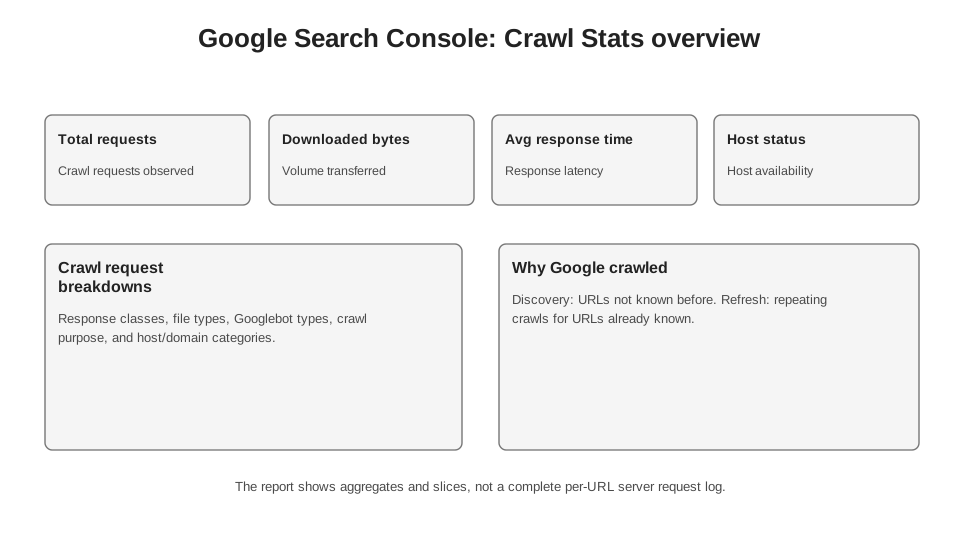
A schematic representation of the official report. Search Console shows crawl purpose separately: discovery of a URL that Google has not crawled before, and refresh - recrawling a known URL.
| Crawl Stats field | What can be established | What can't be established |
|---|---|---|
| Total crawl requests | The volume of Google's requests to URLs and resources on your host | How many unique pages were fully reassessed. |
| Total download size | How many bytes Google downloaded during the period | That a larger volume is a problem in itself. |
| Average response time | The average response time for requested resources | The TTFB of a specific important template without segmentation. |
| Host status | Whether there were significant robots.txt, DNS or network connectivity issues | The root cause of a business downturn without additional diagnostics. |
| Crawl purpose | Discovery or Refresh | The full priority of a URL within the scheduler. |
| Googlebot type | Smartphone, Desktop, Image, Video, page resources, etc. | That every request had the same SEO value. |
| Example URLs | Examples of requests in the selected segment | A complete list of all Googlebot requests. |
6.5. Discovery and Refresh: discovering new URLs and recrawling
In Crawl Stats, Google divides crawl purpose into Discovery and Refresh. Discovery means that the URL has not previously been crawled by Google. Refresh is a repeat request for a known page.[2] This is a useful distinction for releases. If you have just published a large set of new pages or submitted a sitemap, it is reasonable to expect an increase in crawling of new URLs. If the problem is that prices, product availability or news are becoming outdated in search results, you need to look not only at the discovery of new URLs but also at recrawl frequency.
I do not set a KPI of “Discovery must account for X% of all requests”. Such a percentage is meaningless without context. The normal profile will differ for a news site, a catalogue after a large import and a mature encyclopaedic site. The right question is whether crawl frequency matches the business's rate of change for a particular page type.
6.6. Server logs: when aggregates are no longer enough
As soon as the question becomes “exactly which URLs does Googlebot crawl, how often and with which status codes?”, I turn to server logs. They contain what Search Console does not: the exact time, the specific URL, the HTTP status code, the response size, User-Agent, IP and, if the infrastructure logs it, response time. This allows requests to be grouped by patterns, parameters, status codes and time.
User-Agent is not enough for verification. Google explicitly warns that it can be spoofed. For a high-stakes audit, you need to verify IPs through reverse DNS lookups or match them against the official Googlebot IP ranges.[3] Later in this book, I use the term “Googlebot in the logs” only for traffic that has already passed this verification.
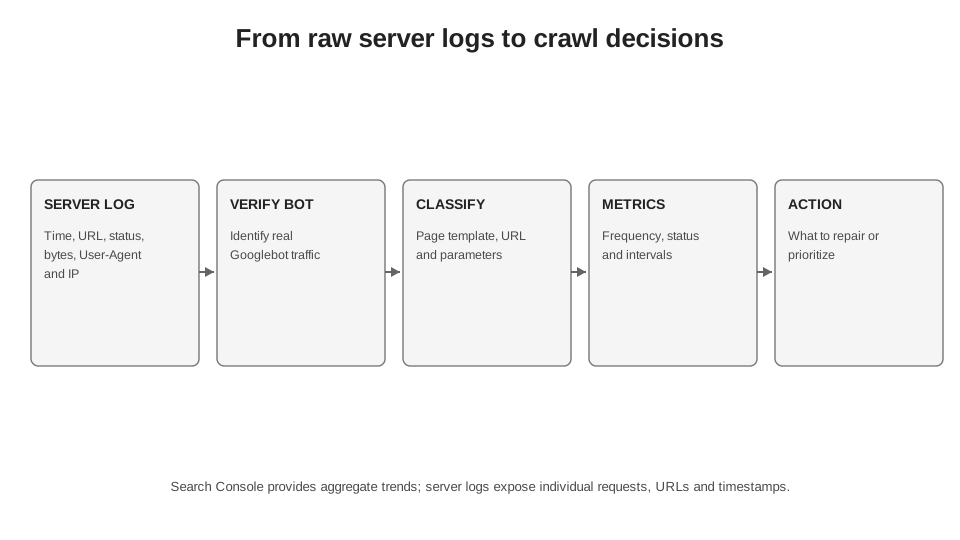
An unclassified log gives you millions of rows. Value emerges after bot verification, URL normalisation and mapping to page types.
| Log field | Why it is SEO | Common mistake |
|---|---|---|
| Time (timestamp) | Calculate first crawl times, recrawl intervals, peaks and delays | Mix time zones or round to the day too early. |
| URL / path / query | Build patterns and identify parameter spaces | Analyse each URL individually and lose sight of the structure. |
| HTTP status code (status) | Separate 2xx, redirects, 404/410, 429, 5xx | Look only at the number of 200 responses. |
| Response size (bytes sent) | Assess network traffic and large responses | Confuse compressed and uncompressed bytes from different logging layers. |
| response time | Identify degradation specifically in Googlebot requests | Compare different servers without normalisation. |
| User-Agent + IP | Verify the crawler type | Trust only the Googlebot string in the UA. |
| Referral source (referrer) | Sometimes useful for other bots/requests | Expect Googlebot always to pass the source where it discovered new URLs. |
6.7. Metrics I calculate from logs
There is no universal “correct crawl frequency”, so I do not compare a site against an abstract industry percentage. I establish a baseline by page type, then examine how it changes after releases, migrations, facet restructuring or server optimisation.
Formula 6.1. Useful crawl share.
This is an internal operational metric. A “target canonical” is defined by your inventory, not by an external standard.
Formula 6.2. Unwanted crawl share.
Non-target URLs can include facets, internal search, obsolete parameters, infinite calendars and other URLs that you deliberately do not want to maintain as pages for search.
Formula 6.3. First crawl latency.
Calculate the median and percentiles separately by page type. A few extreme long-tail values can easily distort the mean.
Formula 6.4. Recrawl interval.
Aggregate by page type, rather than using a single number for the entire site.
| Metric | Level of analysis | What I want to see after the fix |
|---|---|---|
| Useful crawl share | Host → directory → template | A larger share of requests goes to target URLs if we have genuinely removed wasteful URL spaces. |
| Unwanted crawl share | Parameter / facet / internal search | A decline in requests to URLs with no search value. |
| First crawl latency | New URLs of the same type | A shorter median time from publication to the first verified crawl. |
| Median recrawl interval | Frequently changing URLs | Frequency better matches the actual rate of change. |
| 5xx/429 share | Host and individual templates | Fewer errors and no correlation between crawl peaks and server degradation. |
| 304 share | Stable URLs | Correct freshness validation for unchanged documents without unnecessary content transfer. |
6.8. 304 Not Modified: savings without an imaginary “ranking boost”
Google explicitly recommends supporting HTTP caching and 304 Not Modified. If a document has not changed since the previous crawl, a 304 tells the crawler that it can use the cached version without transferring the full content again. This saves network traffic and server resources.[1][5]
At the same time, 304 should not be sold as a “ranking factor” or a way to force Google to crawl more. The correct conclusion is more modest: for large sites with a high share of repeat requests for unchanged content, freshness validation can make repeat retrieval cheaper. Whether those savings translate into more crawling of your important URLs depends on demand and capacity, not on a single header.
6.9. Faceted navigation: the most common way to create more URLs than the business needs
Google identifies faceted navigation as one of the most frequent causes of excessive crawling that site owners bring to the Search team. The problem is not filters themselves, but the combinatorial URL space: each attribute and each ordering of parameters can generate a new URL that the crawler cannot assess before requesting it.[4]
If these pages are not needed in search, Google recommends preventing them from being crawled, for example through robots.txt, or designing filters so that they do not create crawlable URLs. If some facets are needed as landing pages, the task is more complex: you need to clearly separate combinations that should be indexed from the technical “long tail” of parameters, maintain a stable parameter order, return 404 for empty combinations and avoid creating infinite spaces.[4]
| Pattern | Why it's expensive | What to check |
|---|---|---|
| Facets and sorting | The number of combinations grows faster than the useful inventory | Which combinations have search demand; whether the rest are crawlable; parameter order; canonical; robots. |
| Internal search | Each query can create a new URL | Whether there are crawlable links to search results; whether these URLs should be in the index. |
| Calendars | Can generate endless navigation into the future/past | Date boundaries, nofollow/robots, 404 for non-existent intervals. |
| Session IDs / tracking parameters | One document acquires many technical URLs | Parameter sources, internal links, canonical, server-side normalisation. |
| Protocol/host/path duplicates | Inventory multiplies without adding value | Redirects, canonical, internal URLs, sitemap, host configuration. |
| Soft 404 | The URL returns 200 but actually has no useful content | A proper 404/410 or real content instead of an empty template page. |
6.10. HTTP status codes: do not try to control crawl rate with the wrong codes
Google explicitly warns against using 401, 403 or 404 for rate limiting. No 4xx code other than 429 signals “the server is overloaded”. 429 specifically means Too Many Requests and is treated as a server overload signal. 5xx codes also reduce crawling intensity.[5]
In an emergency where crawling traffic needs to be reduced sharply for a few hours or one or two days, Google recommends returning 500, 503 or 429. This is a blunt instrument: it affects the entire host, slows the discovery of new URLs and recrawling, and if the errors persist for several days, URLs may start dropping out of the index. It is not a permanent mechanism for “budget optimisation”.[5]
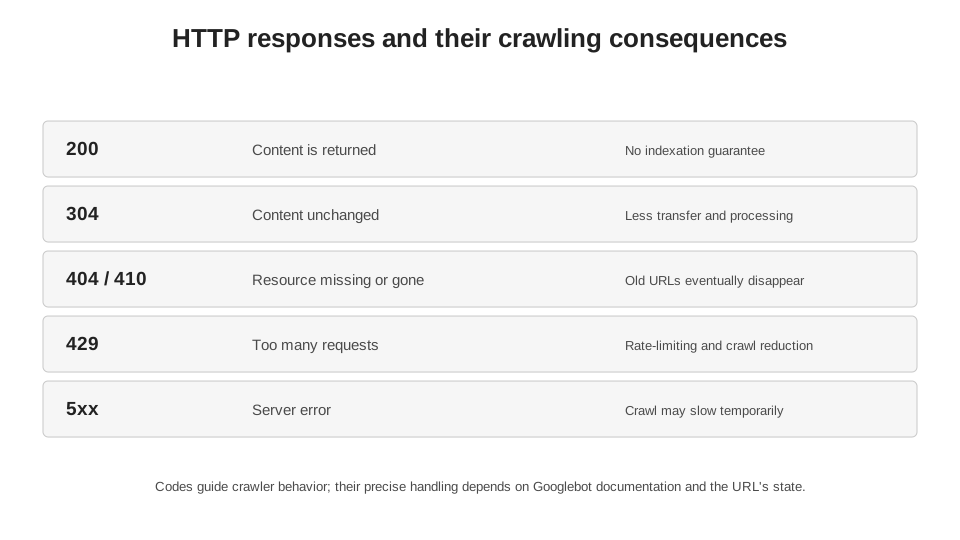
The diagram summarises Google’s official documentation. For full details on how each status code is handled, see source 5.
6.11. robots.txt - critical infrastructure, not a file you can serve “however it happens to work”
robots.txt itself also needs to be crawled. Google usually caches it for up to 24 hours, but may retain the cache longer if an update is unavailable. A particularly dangerous scenario is a 5xx response for robots.txt. The official specification describes the behaviour over time: for the first 12 hours, Google stops crawling the site but continues trying to fetch robots.txt; then, for up to 30 days, it may use the last available version, if one exists; after 30 days, its behaviour depends on the site’s overall availability.[5]
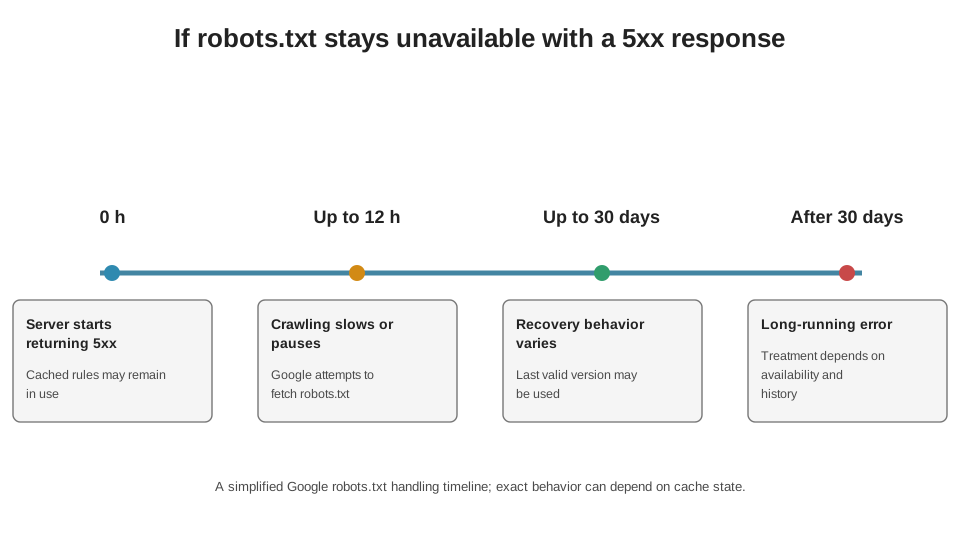
Source: Google Crawling Infrastructure. The diagram does not replace the full specification for DNS, timeouts and other network errors.
The practical takeaway: robots.txt availability needs to be monitored as an availability-critical endpoint. If a CDN, WAF or deployment accidentally starts returning 5xx for /robots.txt, the consequences are not limited to the file itself. This can stop or substantially alter crawling across the entire host.
6.12. The byte limit: “the page opens in a browser” does not mean Googlebot fetched all of it
In March 2026, Google provided a separate explanation of its fetching infrastructure limits. For Googlebot’s general web search crawling, up to 2 MB of a single supported resource is fetched in uncompressed form, including HTTP headers; for PDFs, the limit is 64 MB. Once the limit is reached, the crawler stops fetching and passes on only the portion already received. Each CSS or JavaScript resource referenced by the HTML is requested separately and has its own limit.[5]
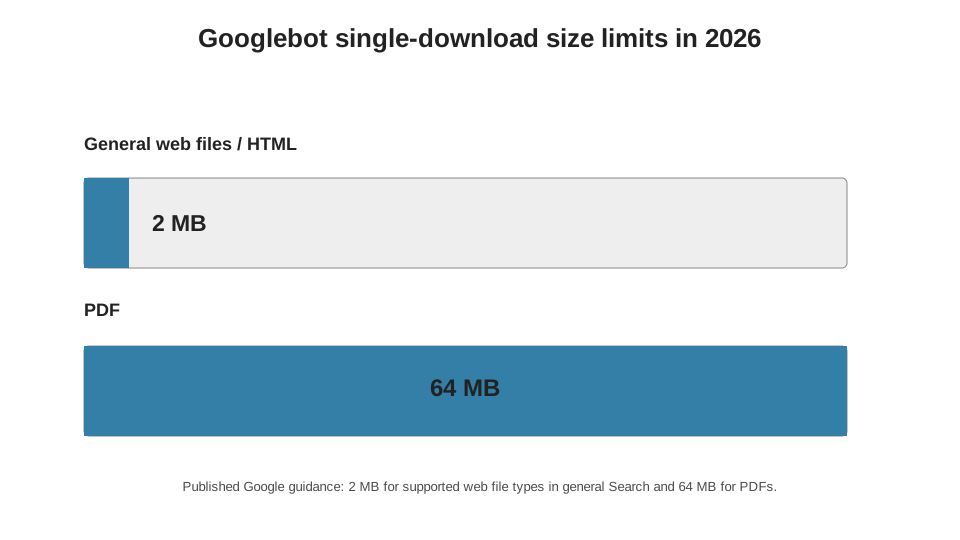
2 MB for supported file types in general web search; 64 MB for PDFs. Other Google crawlers may have different limits.
For most HTML pages, 2 MB of uncompressed HTML is a very large amount. But with massive templates used for page generation at scale, long catalogues or pages with embedded data, this is no longer a theoretical limit. I check not only the transfer size after gzip/brotli compression, but also the actual uncompressed response body, because that is what Google’s stated limit applies to.
6.13. Python: minimal analysis of verified Googlebot logs
Below, I deliberately avoid trying to parse every possible nginx/Apache format. Different teams already send logs to S3, BigQuery, ClickHouse or CSV with different fields. The script expects a normalised CSV after Googlebot verification, with timestamp, url, status, bytes and response_time columns. The SEO task then is to turn requests into understandable patterns.
NO CODE: PROMPT FOR AI
I will upload verified_googlebot.csv with timestamp, url, status, response_time and bytes columns. Check data types and missing values. Segment URLs using the rules I provide for product/category/search/other, calculate the number of requests and unique URLs, median response time, volume of bytes transferred, proportions of 2xx/3xx/4xx/5xx responses and median recrawl interval. Show anomalies, but do not draw causal conclusions without additional data.
ALTERNATIVE WITHOUT AI
If the CSV is already normalised, the same can be done in Excel/Sheets: add a page-type column and a status-code class, then create a Pivot Table. For the recrawl interval, sort by URL + timestamp and calculate the difference from the previous request; Power Query is more convenient for large files.
QR: CODE
Scan with your camera: the QR code contains a compact, executable version of the code without comments. The commented code is provided below.
FOR AUTOMATION: PYTHON FOR LOG ANALYSIS
Code 6.1. Basic segmentation of verified Googlebot requests by page type, status code and median recrawl interval.
import pandas as pd
from urllib.parse import urlsplit

# Expected fields: timestamp, url, status, response_time, bytes.
# The CSV should contain already verified Googlebot requests.
df = pd.read_csv(
    "verified_googlebot.csv",
    parse_dates=["timestamp"]
)

# 1) Determine the page type by URL path.
# Replace the rules below with the structure of your site.
def page_type(url):
    path = urlsplit(url).path
    if path.startswith("/product/"):
        return "product"
    if path.startswith("/category/"):
        return "category"
    if path.startswith("/search/"):
        return "internal_search"
    return "other"

# 2) Add the page type and HTTP status family.
df["page_type"] = df["url"].map(page_type)
df["status_family"] = (df["status"] // 100).astype(str) + "xx"

# 3) Summary: how many requests, how many URLs,
# median response time and bytes transferred.
summary = (
    df.groupby("page_type")
      .agg(
          requests=("url", "size"),
          unique_urls=("url", "nunique"),
          median_response_time=("response_time", "median"),
          downloaded_bytes=("bytes", "sum"),
      )
      .sort_values("requests", ascending=False)
)

# 4) Proportion of 2xx/3xx/4xx/5xx within each page type.
status = pd.crosstab(
    df["page_type"],
    df["status_family"],
    normalize="index"
)

# 5) Median interval between re-requests to the same URL.
ordered = df.sort_values(["url", "timestamp"])
ordered["prev"] = ordered.groupby("url")["timestamp"].shift(1)
ordered["recrawl_hours"] = (
    ordered["timestamp"] - ordered["prev"]
).dt.total_seconds() / 3600
recrawl = ordered.groupby("page_type")["recrawl_hours"].median()

print(summary)
print(status)
print(recrawl)
After this, I add business fields: target canonical URL, indexability, template version, last-modified time, publication date and inventory status. The log then stops being a “technical file” and becomes a system that can answer questions such as: how many hours, at the median, Googlebot needs to crawl a new product for the first time; what percentage of its requests go to /search/; whether the proportion of 5xx responses fell after an infrastructure change; whether the recrawl interval shortened for pages where prices change daily.
6.14. Diagnostics: what to do if Google crawls “the wrong things”
| Symptom | Strongest first hypothesis | Data to test | Action |
|---|---|---|---|
| Many crawl requests to facets | URL inventory bloated by parameters | Logs + site crawl + parameters + robots | Define the set of facets that should be indexed; remove the rest from the crawlable graph or block them according to the strategy. |
| New URLs wait a long time for their first crawl | Low demand, weak discovery of new URLs or an overloaded host | Publication time, first Googlebot request, sitemap, internal links, Crawl Stats | Separate new URL discovery issues from server capacity issues; do not treat everything with the request indexing button. |
| Crawl spikes coincide with 5xx responses | The host cannot handle the load | Response time, 5xx/429 by minute, CPU/DB/CDN metrics | Increase server capacity; do not block Googlebot with 403/404 responses. |
| Google constantly crawls deleted URLs | Old inventory continues to receive signals or incorrect responses | Status-code history, internal/external links, sitemap, redirects | Return 404/410 for genuinely deleted pages; remove links and URLs from the sitemap; avoid soft 404s. |
| Stable pages return a full 200 response on every recrawl | No effective freshness validation | ETag/Last-Modified/If-Modified-Since, logs | Configure correct HTTP caching and 304 responses where the document genuinely has not changed. |
| Crawl Stats shows slower responses | The infrastructure or template has become more resource-intensive | Breakdown by file type / host + server metrics | Identify the specific resource type or endpoint; do not draw conclusions from the site-wide average alone. |
6.15. The crawl budget audit sequence I use
I start with the inventory, not the log. If the team itself does not know which URL types should exist in search, it is impossible to determine what is “wasteful” in crawl traffic. Next, I look at Crawl Stats to understand the scale, host status, response-time profile and discovery/refresh ratio. Only then do I move on to logs, because without context, millions of rows can easily become attractive but meaningless charts.
| Stage | Question | Output Artifact |
|---|---|---|
| 1. URL inventory | Which URLs does the business want to maintain as pages for search? | Matrix: page type → intended for indexing / not intended for indexing / crawlable / blocked. |
| 2. Architecture | Where do unnecessary URLs come from? | Map of parameters, facets, sort orders, internal search and calendar URL spaces. |
| 3. Crawl Stats | Is there a scale or host health issue? | Trends in requests, bytes, response time, 5xx/429, Discovery/Refresh. |
| 4. Logs | Which URLs does Googlebot actually request? | Distribution of requests by template, status code, interval and delay to first crawl. |
| 5. Server | Is Googlebot hitting server capacity limits? | Correlation of crawl traffic with latency, 5xx/429, CPU, DB, CDN. |
| 6. Hypothesis | What exactly are we changing, and what effect do we expect? | Before/after comparison using a specific metric, not “Googlebot got better”. |
| 7. Monitoring | Have we made new URL discovery / deindexing / UX worse? | Parallel monitoring: Page Indexing report, GSC, sitemap and organic visibility. |
6.16. What you definitely should not do
Do not block everything indiscriminately in robots.txt just because Googlebot visits it frequently. If a URL first needs to be removed from the index using noindex, the crawler must be able to retrieve that directive. Do not make random daily changes to robots.txt “to redistribute the budget”: Google explicitly advises against using the file as a temporary redistribution mechanism. Do not return 403 or 404 to “slow the bot down”. And do not measure success simply by a drop in the total number of crawl requests - fewer requests can mean either greater efficiency or a loss of demand.[1][5]
6.17. Myths I would throw out of technical SEO
| Myth | What is proven | Practical conclusion |
|---|---|---|
| “Every site has a fixed daily crawl budget” | Google describes an adaptive model of capacity and demand. | Do not look for a single number that Search Console does not show anyway. |
| “Every site needs crawl budget optimisation” | Google specifically targets its advanced guide at large/dynamic sites or sites with a substantial proportion of URLs marked “Discovered - currently not indexed”. | For a small site, new URL discovery, indexability, canonicals and quality are more often what matters. |
| “A faster server automatically means more crawling” | Better server capacity can raise the crawl capacity limit, but crawl demand is also needed. | Server optimisation is necessary when the server is the bottleneck, but it does not create demand on its own. |
| “404 saves crawl budget by limiting the crawl rate” | 4xx responses, except 429, do not reduce the crawl rate as an overload signal. | Use 404/410 to indicate removed content, not for rate limiting. |
| “Crawl Stats is a complete Googlebot log” | The URL examples in the report are representative, but not exhaustive. | URL-level analysis requires server logs. |
| “noindex saves crawling” | Google must fetch the page to read noindex. | Do not confuse indexing control with crawling control. |
| “A drop in crawl requests after changes is always good” | Fewer requests can also mean lower demand. | Assess crawl delays for important URLs, coverage and recrawling, rather than the total request count in isolation. |
6.18. What we know for certain and what remains a hypothesis
We know for certain: Google defines crawl budget through capacity and demand; a large, unnecessary URL inventory can reduce efficiency; response time, 5xx and 429 affect crawl capacity; popularity and staleness affect demand; 304 can save network traffic; Search Console Crawl Stats is aggregated, and its URL examples are not a complete log; faceted navigation can create a practically infinite URL space; Googlebot has documented byte limits per fetch.[1][2][4][5]
What is not publicly known: the scheduler’s exact formula, the weight of each signal, the individual “cost” of a particular URL in the crawl queue, or the guaranteed amount of additional crawling after speeding up the server or blocking facets. If an SEO specialist claims “Google allocated us 187,432 notional crawl credits per day” without internal Google data, that is not a fact but a model or a fabrication.
6.19. Practical takeaway
Crawl budget only makes sense when we stop treating it as a magical limit. A large site has a URL inventory, server capacity, search engine demand, a history of changes and specific HTTP responses. SEO can have a very strong influence on the first, a partial influence on the second, an indirect influence on the third, and direct control over the accuracy of the fourth and fifth.
My working criterion is simple: important new URLs should receive their first crawl quickly, important updated URLs should be recrawled at a frequency that matches their business dynamics, and the server should not spend a substantial share of its resources on URLs that the product does not intend to maintain in search. Everything else is a means of measuring this system.
Sources for Chapter 6
1. Google Crawling Infrastructure: Optimise your crawl budget. https://developers.google.com/crawling/docs/crawl-budget Updated July 22, 2026.
2. Google Search Console Help: Crawl Stats report. https://support.google.com/webmasters/answer/9679690?hl=en
3. Google Search Central: Googlebot. https://developers.google.com/search/docs/crawling-indexing/googlebot Updated February 3, 2026.
4. Google Crawling Infrastructure: Managing crawling of faceted navigation URLs. https://developers.google.com/crawling/docs/faceted-navigation
5. Google Search Central / Crawling Infrastructure: technical crawling references. https://developers.google.com/search/blog/2026/03/crawler-blog-post ; https://developers.google.com/crawling/docs/crawlers-fetchers/reduce-crawl-rate ; https://developers.google.com/crawling/docs/troubleshooting/http-status-codes ; https://developers.google.com/crawling/docs/robots-txt/robots-txt-spec Googlebot fetch limits, emergency crawl rate reduction, HTTP status codes and robots.txt behaviour.