Links, sitemaps, URL Inspection, orphan pages, robots.txt, redirects and IndexNow. Where knowledge of a URL’s existence ends and actual crawling begins.
Data and sources as of: September 12, 2026
In technical SEO, it is very easy to skip the first stage and immediately ask why a page is not being indexed. But before indexing, there is a simpler question: how does the search engine even know that this URL exists? Google explicitly calls this stage URL discovery, that is, discovering URLs. There is no central registry of all pages on the web. A search engine continually adds new addresses to its set of known URLs and only then decides when to crawl them.[1]
This distinction matters in practice. If a URL has not entered the search engine’s known set, the technical details of the page itself do not matter yet: Googlebot has not fetched the HTML or seen the title, canonical, noindex, text or structured data. If the URL is already known but has not been crawled, we have a different class of problem. And if it has been crawled but is not being indexed, that is the next stage of the system.
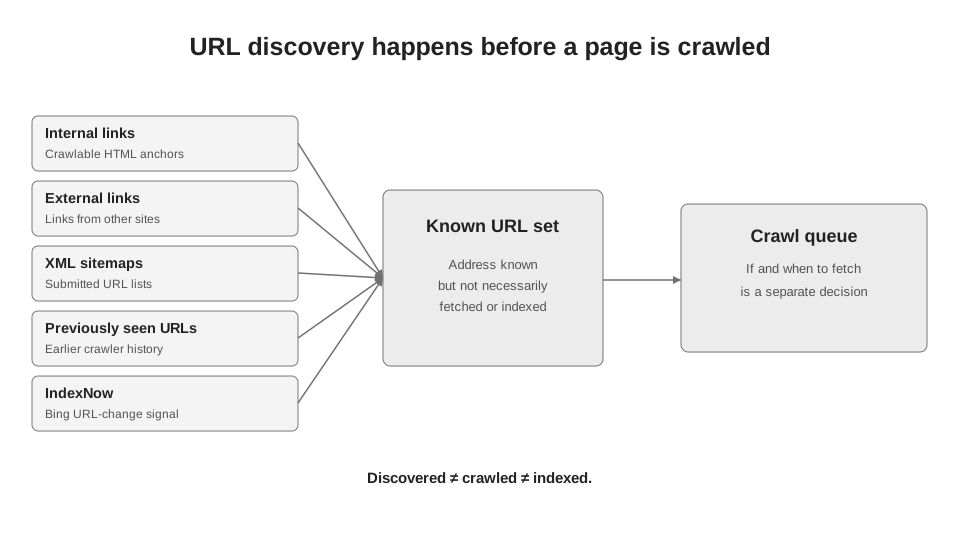
Author’s diagram based on Google Search Central and Bing Webmaster Guidelines.
5.1. Discovered does not mean crawled
Google’s official description sets out the process quite directly: some pages are already known from previous visits, other URLs are found through links on known pages, and the site owner can submit a list of addresses through a sitemap.[1] After a URL is discovered, Googlebot may visit it, but that is a separate system decision. Google itself also does not guarantee that a page will be crawled, indexed or shown in results, even if it meets the technical requirements.[1]
This is clear in Search Console. The status “Discovered - currently not indexed” means that Google has found the URL but has not yet crawled it. In this state, the absence of a last crawl time is no mystery: the page’s content has not yet been fetched. That is why I never start diagnosing this status by rewriting the title or adding schema. First, we need to understand how the URL entered the system and why it is not progressing to the next step - crawling.[7]
5.2. Where a search engine can learn about a URL
For a practical audit, I divide the sources into five groups. Four of them are universal across the classic web: internal links, external links, sitemaps and addresses already known to the search engine. The fifth group consists of active notification mechanisms, such as IndexNow in Bing. These do not replace the link graph, but they shorten the path from a change on the site to a signal reaching the search engine.[10][11]
| Source | What it actually reports | What does not guarantee |
|---|---|---|
| Internal link | An accessible page contains a link to another URL | That the target will be crawled or indexed quickly |
| External link | Another site links to the URL | That the URL will become canonical or rank |
| Sitemap | The site owner declares a set of preferred URLs | That Google will fetch, crawl or index every URL |
| Previously known URL | The address was already in the system from previous crawls or historical records | That the current content at the address has already been rechecked |
| IndexNow for Bing | The site actively reports the addition, modification or deletion of a URL | That Bing will necessarily crawl or index the page |
5.3. An internal link is not just about PageRank
In SEO, internal links are often discussed in terms of PageRank distribution or topical relationships. But their first function is simpler: they create a path along which a crawler finds other URLs. Google explicitly states that it uses links, among other things, to find new pages to crawl.[2]
That is why “the page is in the user’s menu” and “the HTML contains a crawlable link” are not always the same thing. An interface element may look like a link but technically be a button, a span with a JavaScript handler, or an element whose URL appears only after interaction. For Google, the safest baseline option is an HTML <a> element with an href attribute.[2]
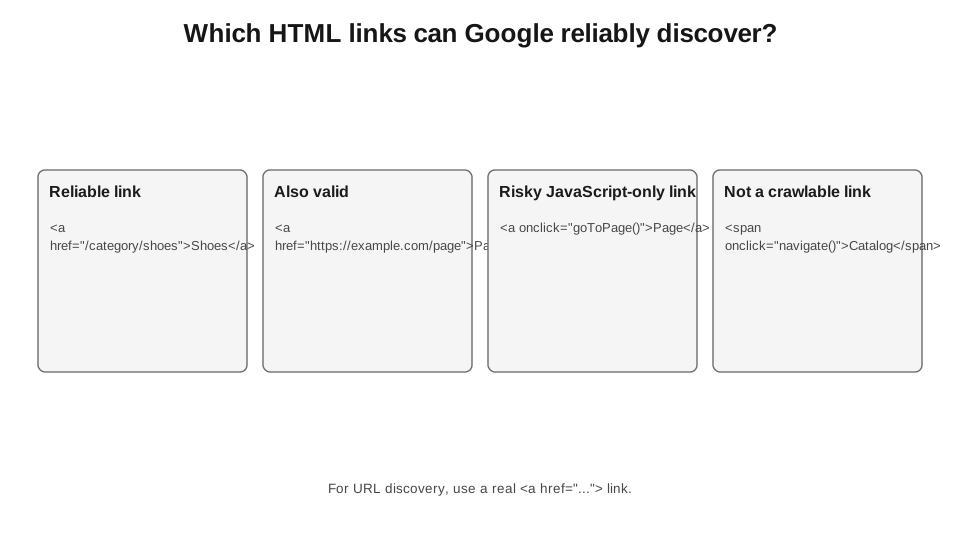
Syntax examples adapted from Google Search Central, Link best practices.
| HTML / Behavior | Reliability for detection | Comment |
|---|---|---|
| <a href="/product/123"> | High | A standard link element with href. |
| <a href="https://example.com/page"> | High | A full absolute URL is also processed normally. |
| <a onclick="go()"> | Low | No href. Google does not promise to extract URLs reliably from this type of element. |
| <span onclick="navigate()"> | Low | This is not a link element. Critical navigation should not rely solely on this approach. |
| A URL that appears only after a user action | Depends on the implementation | For the critical page discovery path, it is better to have standard links. |
5.4. The mobile version can silently truncate the link graph
Following Google’s move to mobile-first crawling, differences between desktop and mobile navigation are particularly dangerous. Google’s official documentation explicitly recommends providing the same set of links on mobile as on desktop. If this is not possible, the URLs should at least be supported through a sitemap; a limited set of mobile links can slow the discovery of new pages.[5]
In practice, this is a common problem with large catalogues. On desktop, a category may have full pagination, links to subcategories and filters, while the mobile version shows only the first batch of cards and a “show more” button. If the additional URLs do not exist in the initial HTML and have no other discovery paths, we are creating different site graphs for the user and for Google’s primary crawler.
5.5. A sitemap is an inventory, not a substitute for architecture
Google defines a sitemap as a way to report new or updated pages. For a small, well-linked site, a sitemap may not be critical to discovery itself: Google writes that if all important pages are accessible through navigation and internal links, most of the site can usually be found without one. At the same time, a sitemap is particularly useful for large sites, new sites with few backlinks and specialised media content.[3]
There is an important methodological detail here. A sitemap does not prove that a page is well integrated into the site. It simply adds another discovery channel. A URL can be in a sitemap without having a single internal link. The search engine will know the address, but in terms of site structure, it is still an orphan page. For a commercial or informational page that we want to rank, this is usually a weak setup.
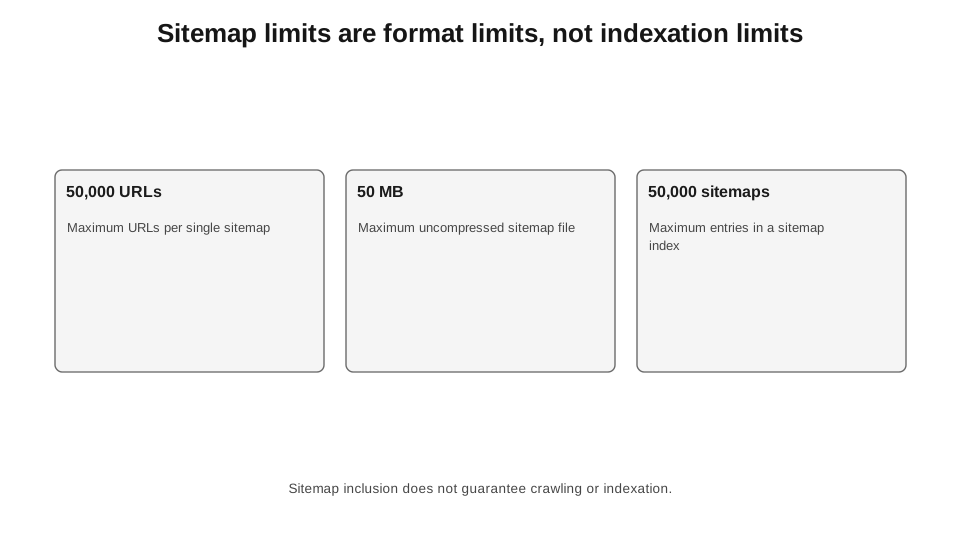
Google Search Central: up to 50,000 URLs or 50 MB uncompressed in a single sitemap; a sitemap index can contain up to 50,000 loc entries.[4][12]
| Sitemap rule | What to do in practice |
|---|---|
| Up to 50,000 URLs or 50 MB uncompressed | Split larger sets into separate sitemaps. |
| Use full absolute URLs | Do not submit relative URLs such as /page or other ambiguous addresses. |
| Include URLs you want to appear in Search | Do not clutter the sitemap with redirects, 404s or technical variants. |
| Prefer canonical URLs | A sitemap is one signal of the preferred canonical version, but it is not a directive. |
| A sitemap is a hint | A URL’s presence in the file does not guarantee crawling or indexing. |
| The order of URLs in a sitemap does not matter to Google | Do not waste time artificially sorting by “priority”. |
5.6. lastmod works only when it can be trusted
Google specifically states that it uses the <lastmod> value if it consistently and verifiably reflects a significant change to the page. A change to the main content, structured data or links may be significant. A change to the copyright date is not.[4]
So the practice of “setting every URL to the current date every day” does not magically speed up the system. It reduces the signal’s informational value. For large sites, I would rather have 20% of URLs with an honest lastmod than 100% with a date that changes every night without any actual change to the page.
5.7. An orphan page is a classification within your dataset, not an absolute fact
The term “orphan page” is often used too confidently. The Screaming Frog crawler, or any other tool, does not know every path through which Google may ever have found a URL. If a page has no inbound internal links in your site crawl, it may be in a sitemap, have a backlink, be known from a previous version of the site or already be in the index.
That is why I use more precise classifications. “No inbound internal links” is a fact from our crawl. “Present only in the sitemap” is a fact based on two sources. “No internal links, sitemap entries or Googlebot requests found during the selected period” is a stronger signal, but still not proof that Google has never known the URL. Such wording makes an audit much more honest.
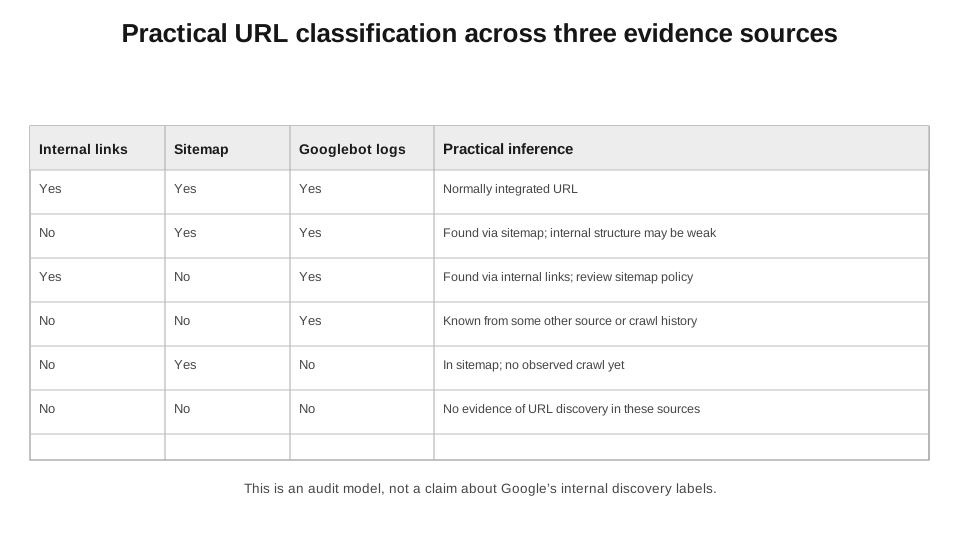
This is a working audit model, not Google’s internal classification.
| URL class | Interpretation | Typical action |
|---|---|---|
| Internal links + sitemap | Properly integrated into two discovery systems | Check the subsequent stages: crawling, canonical, indexing. |
| Sitemap only | The address has been submitted directly but is not integrated into the internal graph | Determine whether the page truly deserves indexing. If so - add logical internal links. |
| Internal links only | The page is accessible through the graph but absent from the sitemap | Not always an error. Check the sitemap policy and canonical status. |
| Logs only | Googlebot has already requested the URL, but it does not appear in the current site crawl or sitemap | Check historical URLs, redirects, backlinks and parameters. |
| Nowhere in the sample | No evidence of an accessible path in the current data | Look for the source generating the URL or add the required discovery path. |
5.8. URL Inspection provides clues about the discovery source, but not a complete log
In Search Console, the Discovery section may show a sitemap and a Referring page. The Referring page is a page that Google likely used to discover the URL. It may link directly or be further up the chain. If the field is empty, this does not mean that no source page exists. Google itself warns that the information may be unavailable in the tool and that the URL may have been found another way.[8]
The same is visible in the URL Inspection API. The sitemap[] field contains sitemaps known to Google that include the URL, but the documentation explicitly states that the list is not guaranteed to be exhaustive. The referringUrls[] field returns URLs that link to the inspected address directly or indirectly.[9] This is useful for automation, but it does not turn the API into a complete discovery log.
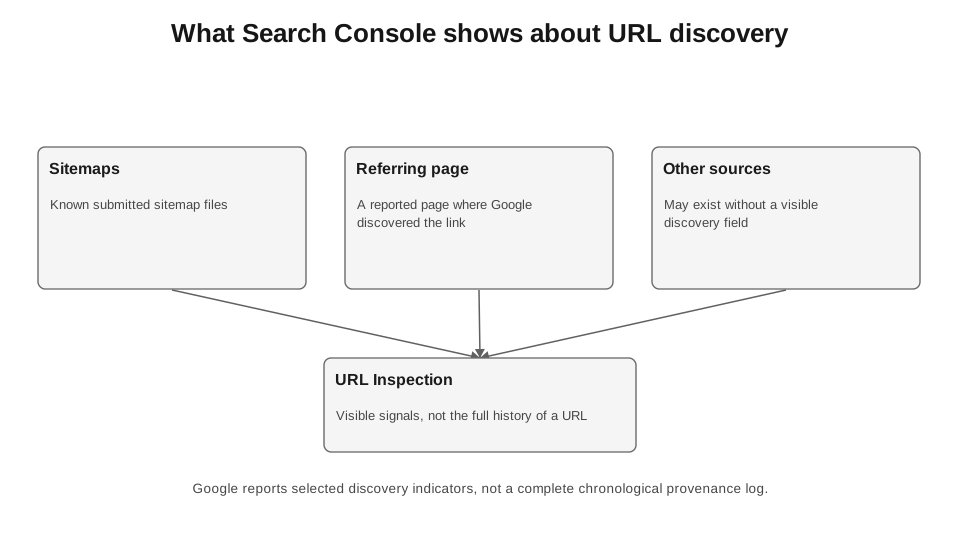
Official fields: Sitemaps and Referring page; URL Inspection API: sitemap[] and referringUrls[].[8][9]
5.9. robots.txt does not hide the fact that a URL exists
robots.txt controls crawler access, not knowledge of an address. Google explicitly warns: if other pages link to a URL blocked in robots.txt, Google may still know the address and even show it in results without a snippet, without fetching the content itself.[6]
This exposes an important technical mistake: you cannot block a page in robots.txt while expecting Google to be guaranteed to read meta robots noindex in its HTML. To see noindex, the page must be fetched. The same applies to a canonical in HTML: it becomes available only after the document has been fetched and processed.
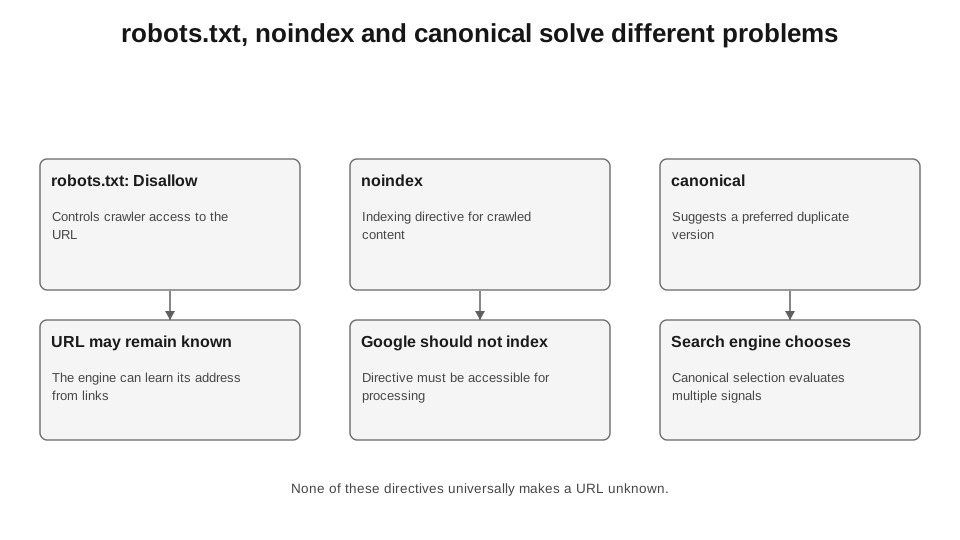
The diagram simplifies the mechanics for diagnostic purposes. Detailed indexing and canonicalisation rules are covered in separate chapters.
| Mechanism | Affects URL discovery | Affects crawling | Affects indexing |
|---|---|---|---|
| robots.txt Disallow | Does not guarantee concealment | Yes, blocks requests from the relevant crawler | Indirectly; the URL may remain known and appear without content |
| meta robots noindex | No | No, the page must be fetched to read the directive | Yes, if Google can read the directive |
| X-Robots-Tag: noindex | No | No, an HTTP response is required | Yes, after the header is received |
| rel=canonical | No | No | A signal for choosing the canonical version, not an absolute command |
| removing internal links | Reduces one of the discovery paths | May affect future frequency by changing the graph | Does not, by itself, remove the URL from the index |
5.10. A redirect can lead a crawler to a new address, but that is the next step after discovering the old one
If Googlebot requests a known URL and receives a 301, 308, 302 or another supported redirect, it follows it to the target address. For permanent server-side redirects, Google also uses the target as a strong signal of the canonical version.[13]
This is an important distinction for migrations. A redirect map is no substitute for internal links to new URLs and a sitemap containing new URLs. A redirect works only after the old address has been requested. If a new section is to be part of the current architecture, I want it to be accessible directly through the internal graph and sitemap, not merely as the endpoint of old 301s.
5.11. Google and Bing have different ways of receiving a signal about a new URL
In its public documentation, Google emphasises links, sitemaps and requests for recrawling through URL Inspection for a small number of URLs.[1][8][14] In addition to traditional links and sitemaps, Bing supports IndexNow - a protocol for proactively notifying search engines about added, changed or deleted URLs.[10][11]
In IndexNow Insights, Bing explicitly shows submitted URLs, submission time and source, and, for a sample, crawl status, indexing status and the time of first indexing. Microsoft also cautions that submitting a URL through IndexNow does not guarantee crawling or indexing.[11]
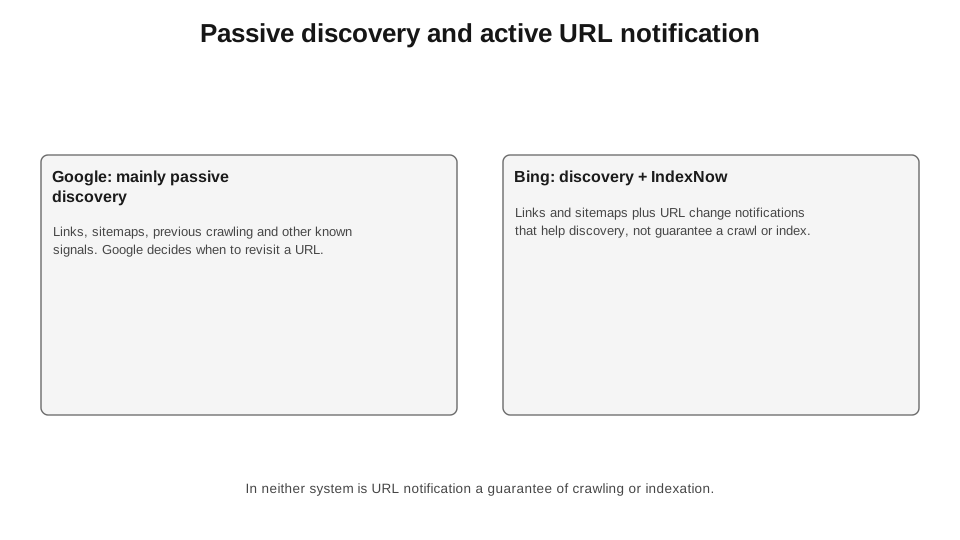
Google is not listed in this book as an IndexNow participant. For Google, its officially documented mechanisms are used; IndexNow is shown here as a separate Bing mechanism.
5.12. A server log proves crawling, but not the moment of discovery
Logs provide strong evidence that a specific user agent made an HTTP request to a specific URL at a specific time. But a log says nothing about how long the URL had already been known to the system before the first request. If Googlebot first requested it on September 12 at 03:14, that does not mean the URL was discovered at precisely 03:14.
That is why, in an audit, I do not use “first recorded Googlebot request” as a synonym for “discovery date”. It is the first crawl date we recorded within the available log period. Discovery may have happened earlier through a sitemap, a link or another source. Search Console may also show a referring page or sitemap, but does not guarantee that this history is complete.[8][9]
5.13. Discovery metrics you can actually calculate for your own site
Google does not publish a universal benchmark such as “95% of pages must be found through internal links”. So I do not use invented industry benchmarks. Instead, I calculate my own consistent metrics by template and track changes over time.
Formula 5.1. Internal graph coverage.
The goal is not to reach a magical 100%, but to find templates where important URLs exist only outside the internal architecture.
Formula 5.2. Share of URLs supported only by a sitemap.
Calculate this separately by page type. A single overall percentage can hide a problem in a specific template.
Formula 5.3. Sitemap coverage of target URLs.
| Metric | Denominator | What it diagnoses | What it does not prove |
|---|---|---|---|
| Internal link coverage | Target URLs eligible for indexing | Whether a path exists in the internal graph | That Google has already followed that path |
| Share of sitemap-only URLs | URLs in the sitemap | How much the sitemap compensates for weak architecture | That the pages are poor or are not being indexed |
| Sitemap coverage | Target canonical URLs | The cleanliness of the inventory of intended URLs | That every page needs a sitemap to be discovered |
| URLs with a first recorded Googlebot request | URLs in the logs for the period | The fact of the first recorded request in the logs | The actual date of initial discovery |
| “Discovered – currently not indexed” | URLs with the corresponding GSC status | Google knows the URL but has not crawled it yet | The specific reason for the delay for each URL |
5.14. My audit sequence when new URLs are “not being picked up”
I start not with the “Request indexing” button, but with a sample of URLs of the same type. For example, 500 new products, 300 landing pages generated at scale or 2,000 new profiles. Then I combine four sources: an internal crawl, a sitemap, Search Console URL Inspection for the sample and Googlebot server logs. This provides significantly more information than manually checking ten random pages.
| Step | Question | Data | Solution |
|---|---|---|---|
| 1. Internal graph | Is there at least one accessible internal link? | Site crawler / link database | If not - fix the architecture or classify the URL as non-target. |
| 2. Sitemap | Is the target canonical URL in the correct sitemap? | XML/RSS/text sitemap | Remove unwanted URLs, add target URLs, check lastmod. |
| 3. URL Inspection | What does Google show in the Discovery section? | Sitemaps, Referring page, coverage status | Do not interpret a missing field as proof that no source exists. |
| 4. Logs | Was there an actual Googlebot request? | Server access logs | Distinguish between “known but not crawled” and “crawled”. |
| 5. Template scope | Is the problem isolated or systemic? | Grouping by page type / directory | Prioritise the template rather than fixing URLs one by one. |
| 6. Next stage | What happens after crawling? | HTTP, rendering, canonical, indexing status | Move on to the next chapters if URL discovery is no longer the problem. |
5.15. A simple Python audit: internal links + sitemap + logs
What follows is not a “magic SEO script”, but a minimal model for merging three sources. The inputs are three CSV files: a list of target URLs with internal inbound link counts, a list of URLs from the sitemap and a list of URLs requested by verified Googlebot over the selected period. The column names are easy to adapt to your export.
NO CODE: AI PROMPT
I will upload three CSV files: internal.csv with the columns url and inlinks, sitemap.csv with url, and googlebot.csv with url and first_seen. First, check the file structure. Build a complete list of URLs from all three sources and determine for each one: whether it has an internal inbound link, whether the URL is in the sitemap, and whether Googlebot has seen it. Classify the URLs using these three signals, count the URLs in each class and show the 20 most important problem URLs in each.
ALTERNATIVE WITHOUT AI
In Sheets/Excel, create a master list of URLs and three flag columns using XLOOKUP/COUNTIF: internal links, sitemap, logs. Then create a pivot table by TRUE/FALSE combinations. Python is only needed when the volume or frequency becomes impractical for a spreadsheet.
QR: CODE
Scan with your camera: the QR code contains a compact executable version of the code without comments. The commented code is provided below.
FOR AUTOMATION: PYTHON FOR MERGING 3 SOURCES
Code 5.1. Minimal URL classification based on internal links, sitemap and server logs.
import pandas as pd

# Expected files:
# internal.csv: url, inlinks
# sitemap.csv: url
# googlebot.csv: url, first_seen
internal = pd.read_csv("internal.csv")
sitemap = pd.read_csv("sitemap.csv")
logs = pd.read_csv("googlebot.csv")

# 1) Create one boolean signal for each source.
internal["has_internal_link"] = internal["inlinks"].fillna(0).gt(0)
sitemap["in_sitemap"] = True
logs["seen_googlebot"] = True

# 2) Do an outer join to avoid losing URLs,
# that are present in only one or two sources.
df = (
    internal[["url", "has_internal_link"]]
    .merge(sitemap[["url", "in_sitemap"]], on="url", how="outer")
    .merge(logs[["url", "seen_googlebot", "first_seen"]], on="url", how="outer")
)

# 3) Missing signal means False, not "unknown".
for col in ["has_internal_link", "in_sitemap", "seen_googlebot"]:
    df[col] = df[col].fillna(False)

# 4) Classify URLs by the combination of the three signals.
def classify(r):
    if r.has_internal_link and r.in_sitemap and r.seen_googlebot:
        return "integrated"
    if (not r.has_internal_link) and r.in_sitemap and r.seen_googlebot:
        return "sitemap_only_but_crawled"
    if (not r.has_internal_link) and r.in_sitemap and (not r.seen_googlebot):
        return "sitemap_only_not_crawled"
    if r.has_internal_link and (not r.in_sitemap) and r.seen_googlebot:
        return "internal_only_but_crawled"
    if (not r.has_internal_link) and (not r.in_sitemap) and r.seen_googlebot:
        return "known_from_other_source_or_history"
    return "no_evidence_in_current_dataset"

# 5) Add a class to each URL and calculate the distribution.
df["discovery_class"] = df.apply(classify, axis=1)
print(df["discovery_class"].value_counts(dropna=False))

# Save the result for manual verification if necessary:
# df.to_csv("discovery_audit.csv", index=False)
In a real system, I add page type, target canonical, HTTP status, indexability, publication date and several time fields. Then the question you can answer is not “how many orphan pages are there”, but “what percentage of new products in category X have an internal inbound link, are present in the sitemap and have already received their first Googlebot request after 48 hours”. This is an operational metric that can be compared across releases.
5.16. What to do about “Discovered - currently not indexed”
The worst response is to click “Request indexing” en masse. For a large set of URLs, this does not address the systemic cause. Google itself recommends URL Inspection for a small number of URLs and a sitemap for large sets. Requesting the same URL again will not make it get crawled sooner.[14]
I start by segmenting the problem. If 12 URLs out of 50,000 have this status, that is one situation. If 70% of URLs using a new template remain in the “discovered” state after two weeks, that is another. I then check whether they are accessible through proper internal links, whether the sitemap contains only canonical URLs returning 200, whether parameters have created millions of alternative URLs, whether the server consistently serves responses, and whether Googlebot reaches this template at all.
It is important not to present an explanation from community help material as the guaranteed cause for a specific site. The official meaning of the status is simple: the URL has been found but not crawled. Why a particular URL goes uncrawled for a long time is a matter of diagnosing the system, not reading a single status message.[7]
5.17. What we know for certain
We know for certain that Google separates URL discovery from crawling.[1] We know that new URLs can be found through links and sitemaps.[1][2][3] We know that a standard <a href> is the basic, reliable structure for links Google can parse.[2] We know the hard sitemap limits: 50,000 URLs or 50 MB uncompressed per file, while a sitemap index can contain up to 50,000 loc entries.[4][12]
We also know that a sitemap is a hint, not a guarantee of crawling or indexing.[4] robots.txt is not a mechanism for hiding the URL itself from Google if the address can be found elsewhere.[6] URL Inspection can show a sitemap and a source page, but these data are not a complete log of all discovery paths.[8][9] Bing separately supports IndexNow as an active notification channel for changed URLs, without guaranteeing indexing.[10][11]
What we do not know from public documentation: the exact internal weight of each discovery channel, a universal time from discovery to crawling, the “ideal” number of incoming internal links for a new URL, or an overall percentage of pages known only through a sitemap beyond which a site will necessarily have a problem. If someone quotes such numbers without their own controlled dataset and methodology, that is no longer a Google fact but a hypothesis.
The main practical takeaway from this chapter is simple. Before analysing rendering, canonical tags or content quality, you need to establish that the target URL exists as an address for the search engine at all and has a proper path into the crawl queue. The next chapter starts right there: the URL is already known. The question now is when, how often and with what priority Googlebot will crawl it.
Chapter sources
1. Google Search Central. In-Depth Guide to How Google Search Works. https://developers.google.com/search/docs/fundamentals/how-search-works The official distinction between URL discovery, crawling and indexing; links and sitemaps as sources of new URLs.
2. Google Search Central. Link best practices for Google. https://developers.google.com/search/docs/crawling-indexing/links-crawlable Google uses links to find new pages; <a href> as the basic crawlable structure.
3. Google Search Central. What Is a Sitemap. https://developers.google.com/search/docs/crawling-indexing/sitemaps/overview When a sitemap is particularly useful; Google can generally find well-connected pages through internal links.
4. Google Search Central. Build and Submit a Sitemap. https://developers.google.com/search/docs/crawling-indexing/sitemaps/build-sitemap 50,000 URLs / 50 MB; absolute URLs; a sitemap as a hint; accurate lastmod; Google ignores priority and changefreq.
5. Google Search Central. Troubleshoot Google Search Crawling Errors. https://developers.google.com/search/docs/crawling-indexing/troubleshoot-crawling-errors Advice on crawlable links, the mobile version, sitemaps and logs.
6. Google Search Central. Introduction to robots.txt. https://developers.google.com/search/docs/crawling-indexing/robots/intro robots.txt controls crawler access, but a URL may remain known and even appear in results without content.
7. Google Search Console Help. Page indexing report / Discovered - currently not indexed. https://support.google.com/webmasters/answer/7440203?hl=en The status means that the page has been found but not yet crawled.
8. Google Search Console Help. URL Inspection tool. https://support.google.com/webmasters/answer/9012289?hl=en Discovery, Sitemaps, Referring page and caveats about the incompleteness of these fields.
9. Google Search Console API. UrlInspectionResult. https://developers.google.com/webmaster-tools/v1/urlInspection.index/UrlInspectionResult The sitemap[] and referringUrls[] fields; lastCrawlTime and other data for the indexed version of the URL.
10. Bing Webmaster Guidelines. https://www.bing.com/webmasters/help/webmaster-guidelines-30fba23a Bing explicitly names IndexNow, XML sitemaps, internal links and external links as discovery channels.
11. Bing Webmaster Tools. IndexNow. https://www.bing.com/webmasters/help/indexnow-0z209wby Active notification of new, changed or deleted URLs; submission does not guarantee indexing.
12. Google Search Central. Manage Your Sitemaps With Sitemap Index Files. https://developers.google.com/search/docs/crawling-indexing/sitemaps/large-sitemaps Up to 50,000 loc entries in a sitemap index; up to 500 sitemap index files per site in Search Console.
13. Google Search Central. Redirects and Google Search. https://developers.google.com/search/docs/crawling-indexing/301-redirects Googlebot follows redirects; a permanent redirect signals the canonical target.
14. Google Search Central. Ask Google to Recrawl Your Website. https://developers.google.com/search/docs/crawling-indexing/ask-google-to-recrawl URL Inspection for a few URLs, a sitemap for large sets; repeated requests do not guarantee faster crawling.